Typora 1.13.8 for Mac
Typora 1.13.8 for Mac
Typora will appeal to both readers and writers. It removes the preview window, mode switcher, source code syntax symbols, and all other unnecessary distractions. It replaces them with a real preview function to help you focus on the content itself.
It has the following features:
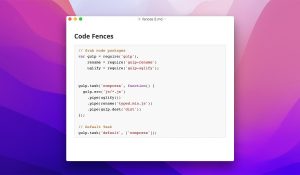
1. Markup support, including tables, code fences with syntax highlighting, LaTeX, and a table of contents.
2. Cross-platform.
3. Real-time preview and WYSIWYG functions.
4. Beautiful interface and support for custom CSS themes.
5. Easy export.
Typora 1.13.8 for Mac The Cleanest Markdown Editor Out There
If you write a lot notes, documentation, blogs, or anything in Markdown Typora is one of the best tools you can have on your Mac. Typora gives you a seamless experience as both a reader and a writer. It removes the preview window, mode switcher, and syntax symbols of Markdown source code, replacing them with a real-time preview so you can focus entirely on the content itself.
What’s New in Version 1.13?
This release upgrades to MathJax v4, meaning line breaks are now supported by default in math equations using \\, along with new TeX packages like begingroup for localizing macro definitions and bboldx for blackboard bold fonts.
The Open in Typora extension for VS Code and Cursor has also been introduced simply right-click any Markdown file to launch it directly in Typora. On top of that, changing Markdown settings no longer requires a full app restart; a simple reload button does the job.
Other improvements include better Mermaid syntax highlighting, improved search performance, smoother sidebar resize behavior, and a new “Copy as Plain Text” option in the context menu.
Core Features
Typora supports full Markdown including tables, code fences with syntax highlighting, LaTeX math, and table of contents. It also offers beautiful interface themes with custom CSS support and easy export options.
PDF export features are now fully enabled on macOS 26.2, and switching between source code mode and hybrid editing mode now preserves your scroll position a small but very welcome improvement.
Who Should Use It?
Typora is perfect for writers, developers, students, and anyone who works with Markdown files regularly. It keeps things simple on the surface while being powerful underneath.
Price: One-time purchase at $14.99 Compatibility: macOS 11 or later
Clean, fast, and distraction-free Typora 1.13.8 continues to be the go-to Markdown editor for Mac users who value simplicity without sacrificing features.




About Author
