Verso Writer 1.0.32 for Mac
Verso Writer 1.0.32 for Mac
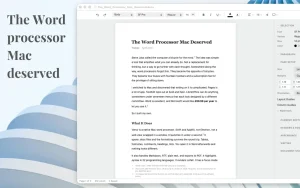
Verso Writer is a lightweight yet powerful text editor. The app strikes the perfect balance between functionality and simplicity: it opens and edits Word documents (including tracked changes), yet lacks a complicated interface. It’s a tool designed exclusively for writing without distractions or unnecessary noise.
Features:
Working with documents
• Format support: Full support for Microsoft Word files (.docx, .doc), including change tracking and comments. Also supported are .odt, .rtf, .txt, .md (Markdown), .html and export to .pdf.
• Track Changes: See all edits insertions are underlined, deletions are struck through. Accept or reject changes one by one or all at once through the convenient sidebar.
• Compatibility: Documents created or edited in Verso open correctly in Microsoft Word, retaining all formatting and edits.
Writing interface
• Focus Mode: One click (⌘⇧F) and the entire interface disappears, leaving only your current paragraph on the screen. Perfect for concentration.
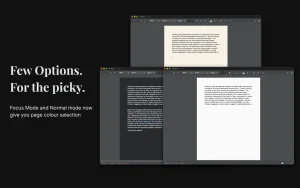
• Page Colors: Choose from five preset backgrounds, including a paper-like mode for comfortable reading in any lighting conditions.
• Light and Dark Theme: Follows macOS system preferences or is selected manually.
Advanced formatting
• Full set: Bold, italic, underline, strikethrough, superscript/subscript, text color and highlight.
• Tables: Insert, adjust size, cell shading, borders, manage rows and columns.
• Document structure: Automatic table of contents (TOC) with page numbers, footnotes, headers, footers, and footers.
• Page layout: Choice of format (A4, Letter, Legal), portrait or landscape orientation, custom margins, multi-column layout.
• Paragraph styles: You can override a style and apply it to all similar paragraphs, updating the document formatting in one click.
Working with code and data
• Markdown with Sync: Open and edit .md files as plain text, preserving all headings, tables, lists, and formatting.
• Syntax highlighting: 22 programming languages are supported (Swift, Python, TypeScript, Rust, Go and others). Code is inserted with automatic highlighting.
• Mermaid Diagrams: Render live sequence diagrams, flowcharts, and other graphics in Markdown documents.
• LaTeX Math: Insert formulas from ChatGPT or Gemini – they are displayed correctly both in a line and as separate blocks.
Verso Writer 1.0.32 for Mac: A Quick Look
Verso Writer is a small, native macOS word processor built by a solo developer with one goal: let people open a document and just write, without subscriptions, accounts, or bloat. Version 1.0.32 is the current build available on the Mac App Store.
The Pitch
Verso sits deliberately between TextEdit and Microsoft Word. It opens .docx files, imports Markdown, and exports back to Word so collaborators using other tools can still read your work. There’s no cloud, no login, and no tracking the app runs entirely offline, weighs in at around 7 MB, and launches in under a second, since it’s built natively with SwiftUI and AppKit rather than Electron or a web view.
Focus-First Design
The app’s signature feature is Focus Mode: the window reshapes around the page, dimming everything except the sentence currently being written, and pressing Esc brings the rest of the document back into view. A clean, fading toolbar, elegant typography, and four page appearances Light, Off-white, Sepia, and Dark round out the writing environment. Cmd+Shift+L cycles between them, with Dark syncing automatically to macOS’s system appearance if preferred.
Built for Real Documents, Not Just Notes
Despite its minimalist feel, Verso handles genuine document exchange: Word-compatible formatting, header and footer support, and page numbering. The interface is fully localized into sixteen languages, including German, French, Spanish, Portuguese, Chinese (Simplified and Traditional), Japanese, Korean, and Arabic a notable level of polish for a one-developer app.
What’s Likely in 1.0.32
No dedicated public changelog for build 1.0.32 was available at the time of writing. Recent point releases in this range have focused on fixing small but meaningful details: correcting undo behavior and custom color application, keeping header/footer colors intact when saving to Word, letting Focus Mode remember window size, and speeding up typing performance in long documents. A build like 1.0.32 likely continues in that vein refining stability rather than adding major new features.
Requirements and Pricing
Verso requires macOS 14 or later and costs $14.99 as a one-time purchase after a 7-day free trial, with no subscription involved.



About Author
