Bear 2.9.2 for Mac
Bear 2.9.2 for Mac
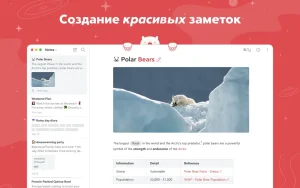
Bear is a beautiful, incredibly easy-to-use app with markup capabilities for capturing and organizing your life’s events through notes.
You can take notes, plan your day, journal, organize spreadsheets, create lists and tasks, sketch out ideas, link notes together, write a book, and much more. The Bear app is used by writers, lawyers, chefs, business leaders, teachers, doctors, engineers, students, parents… You get the idea. Getting started is easy—you don’t need to register or create an account. Just open a note and start writing.
BEAUTIFUL DESIGN. SIMPLICITY. FAST WORK. PRIVACY
– Tools that don’t get in the way while you work with text
– Clip web pages and other content using a dedicated extension for the Bear app
– Updated information panel with table of contents and backlinks
– Ability to use Apple Watch to dictate and add text to recent notes
– Easily create notes using Siri and hotkeys
– “Your notes, not ours” – Bear is a private app: we can’t see your notes, tags, or other data
FLEXIBLE MARKUP
– Use plain text that can be easily transferred between applications
– Use familiar formatting to mark up text, such as bold, italics, strikethrough, links, tables, and more
– Ability to combine different text styles (e.g. bold and underline) even in headings
– Hiding markup for easier reading
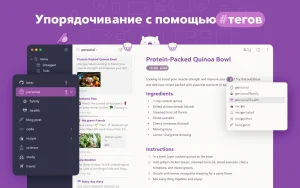
ORGANIZE with #tags, tasks, and more
– Add #tags, #multi-word tags#, and even #multiple tags/nested tags anywhere in a note to quickly organize your entries
– Pin important tags to the top of the sidebar
– Add tasks to notes and easily view all notes that include tasks
– Ability to collapse tabs to free up workspace
ADVANCED SEARCH CAPABILITIES
– Search for notes with Spotlight wherever you are
– Search for text inside photos and PDFs (Bear Pro only)
– Find specific types of notes using the powerful search method of mentions (@todolist, @images, and @yesterday)
MORE POSSIBILITIES WITH BEAR PRO
– Sync notes between iPhone, iPad, and Mac devices via iCloud
– Encrypt individual notes with a completely confidential password
– Bear Lock with Face/Fingerprint Recognition
– Export to other formats, including HTML, DocX, PDF, JPG, and ePub
– Search text inside images and PDFs in Bear Notes
– More than 30 beautiful themes and icons for the application
Bear 2.9.2 for Mac: A Quick Look
Bear, the popular Markdown note-taking app from Shiny Frog, continues to refine its macOS experience with the 2.9.x update series. Version 2.9.2 arrives as a follow-up to the major 2.9 release, which introduced one of the app’s most requested organizational features: Workspace.
What Workspace Brought to Bear
With Workspace, users can turn any tag into a focused writing environment. Once a tag is set as your Workspace, Bear hides everything else the sidebar, archive, and trash all adjust to show only notes tied to that tag. This is especially useful for people juggling multiple projects or separating work notes from personal ones, letting you switch contexts without visual clutter.
Better Control Over the MCP Server
Bear 2.9 also expanded on its MCP server integration (used for connecting Bear with tools like Claude) by adding note-scoping controls. Users can now set “Only tags” to restrict external tool access to specific tagged notes, or “Exclude tags” to keep certain notes private and hidden from integrations entirely.
The 2.9.2 Update
As with most .x.2 point releases, version 2.9.2 is best understood as a stability and refinement update — the kind that follows a major feature release like 2.9. These updates typically focus on squashing bugs, smoothing out edge cases in newly introduced features (like Workspace behavior or MCP scoping), and improving overall performance, rather than introducing new functionality.
Why It Matters
For long-time Bear users on Mac, incremental updates like 2.9.2 matter because they polish the experience of features that were just introduced. If you rely on Bear for Markdown note-taking, keeping the app updated ensures you get the latest fixes and the most stable version of Workspace and MCP scoping.
Note: For the complete, official changelog of Bear 2.9.2, check the in-app “What’s New” section or Bear’s official blog at blog.bear.app, as point-release notes are sometimes not published as standalone posts.



About Author
