Picmal 1.6.7 for Mac
Picmal 1.6.7 for Mac
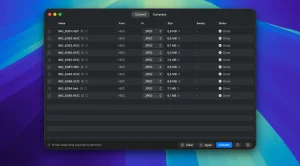
Picmal is a universal offline media file converter and compressor designed for processing images, video, and audio, with fast batch processing and a built-in workflow. It supports over 100 formats, features Finder integration, presets, detailed codec and bitrate control, resizing, color space options, folder monitoring, automation with shortcuts, and local processing that ensures privacy.
Peculiarities:
• Convert to over 100 formats Picmal supports a huge number of formats: from the most popular (JPEG, PNG, MP4, MP3) to specific ones (PSD, RAW, HEIC, WebP, MKV, FLAC, OPUS and others). You can turn PSD to PNG, MOV to MP4, AI to SVG – or perform conversion and compression in one step.
• Batch processing: The app handles hundreds of files at once with ease. Simply drag and drop them into the Picmal window, use the File menu, or the Finder context menu. No need to process files one by one.
• Compress without losing visible quality Reduce the size of images before publishing online or compress videos to fit within email attachment limits. You can compress files while maintaining the original format.
• Resizing Five resizing modes: by percentage, fixed width/height, maximum dimensions, or exact dimensions. All operations (resizing, converting, compressing) are performed in one pass.
• Picmal’s metadata removal automatically removes GPS coordinates, camera data, and timestamps from your images, keeping your files lighter and your data safe from being lost along with them.
• Ready-made presets and manual settings. There are built-in presets for the web, social media, and archiving. For fine-tuning, you can adjust color space, codecs, bitrate, and other parameters.
• Key benefits: Privacy and security: All files are processed exclusively on your Mac. No data leaves the device unlike online converters that require uploading to a server.
• Works without the Internet : Picmal doesn’t require an internet connection after installation. It can be used on a plane, in a cafe with poor Wi-Fi, or when there’s no network at all.
• Integration with macOS The application is lightweight, integrates well with Finder, and supports Quick Actions and Shortcuts.
Picmal 1.6.7 Image, Video & Audio Converter for Mac
Picmal is a clean, fast, and fully offline media conversion and compression tool for Mac, and version 1.6.7 is the latest release from developer Alberto Galca described simply as bringing a steadier file list and a clearer video speed control.
What is Picmal?
Picmal is a native Mac app that converts and compresses images, videos, and audio files entirely on your device. Nothing touches a server, no account is required, and there is no subscription. You drop your files in, pick an output format and quality, and Picmal handles the rest including batch processing hundreds of files in a single pass. It supports over 100 formats across all three media types, covering everything from common formats like JPEG, PNG, MP4, MP3, and FLAC to RAW camera formats including CR2, CR3, NEF, ARW, DNG, RAF, and many more. For images it also handles PSD, WebP, AVIF, HEIC, HEIF, SVG, EXR, and JXL, and for audio it covers FLAC, WAV, AAC, OGG, Opus, AIFF, WMA, and a long list beyond that.
Standout Features
The app is built around simplicity without sacrificing depth. A Convert and Compress toggle at the top keeps the two workflows separate and clear. For compression, a visual slider lets you compare the original and compressed version side by side before committing, so you can dial in exactly the quality level you need. For conversion, you can mix different file types in a single batch images, videos, and audio all in one pass and output files are saved back to their original folder with a customizable prefix or suffix.
Watched folders, introduced in version 1.3.0, automatically process any file dropped into a monitored folder, making Picmal easy to slot into existing workflows. Metadata handling gives you three options strip everything, keep only essentials like orientation and color profile, or preserve all metadata useful for photographers who need to strip location data while keeping color accuracy. A copyright and ownership stamping feature lets you embed your copyright notice, artist name, and contact details into EXIF, IPTC, and XMP fields on every exported photo, even when stripping other metadata. The command-line tool, picmal-cli, supports all the same options for scripted workflows.
What’s New in 1.6.7
Version 1.6.7 delivers two focused improvements a steadier file list that behaves more predictably when files are added or processed, and a clearer video speed control that makes adjusting playback rate during conversion more intuitive. Earlier recent updates fixed a rare crash inside Picmal’s own crash reporting system and improved the command-line tool’s reliability.
Pricing and Compatibility
Picmal is available directly from picmal.app with a free tier covering core features and a paid upgrade unlocking the full feature set. It requires macOS 15.6 Sequoia or later and runs natively on Apple Silicon with Intel Mac support as well.



About Author
