Things 3.22.11 for Mac
Things 3.22.11 for Mac
A clear and simple interface, well-thought-out structure, and powerful functionality. Everyone’s favorite task planner is back – recognizable and updated!
These are the core principles behind Things.
1. Write down everything that comes to mind.
Don’t keep tasks in your head – write them down as soon as they come to mind. Add tasks to Things using a keyboard shortcut (which works from any app) or with Siri.
2. Sort tasks by context and projects
For each large-scale goal, create a project and then fill it with specific tasks that can be completed in one sitting. You can also group projects and tasks by areas for example, “Work,” “Hobbies,” or “Health.” Review all areas regularly and don’t let them slide.
3. Plan your time wisely
To-do lists from your OS calendar and Things tasks are displayed in the app as a single list, so you can quickly create a weekly schedule and stay on top of things. Recurring tasks can easily be set to repeat at a specific time.
4. Cut out the unnecessary
In the morning, check your Inbox, select your tasks for the day from the unsorted list, and move them to the “Today” section. Tasks you’ve already scheduled for today will also automatically appear in this section. That’s it! You don’t need to look at any other lists anymore. Get to work.
5. Structure tasks so that they are easy for you to understand.
To further organize your tasks, tag them with your own tags. Use “Work” to write your quarterly report, or “Household Chores” to drop off your jacket at the dry cleaner or order cat litter. You can create as many tags as you like, search for the ones you need, and filter your lists by them.
THINGS YOU’LL LOVE THINGS FOR
1. Things do not interfere with work.
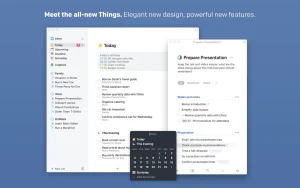
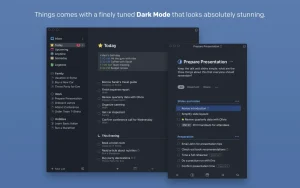
It has a clear, well-designed, and user-friendly interface where everything is in its place. No intrusive special effects, unwanted pop-ups, or menus with hundreds of options. Just you and your tasks.
2. Things is focused on your tasks.
In a list, they appear as brief checkboxes. But just double-click any task, and it opens up to a blank white page with all the information you need, including notes, clarifications, step-by-step instructions, tags, due dates, and reminders.
3. It has a lot of nice little things
The Type Travel feature alone is worth it—it offers incredibly transparent search and navigation across sections. Or the date parser, which correctly understands when you type “tomorrow,” “in three days,” or “on Tuesday.”
4. This is one of the best-made applications for macOS.
Things supports all macOS system features: the Touch Bar, a Notification Center widget, the Share feature, Handoff mode, data exchange with the built-in Calendar and Reminders apps, and automation using AppleScript.
5. Your own option.
If you surveyed twenty people, each would have their own list of the most useful and successful features in Things. That’s why we publish user reviews on our website: thingsapp.com
WORK WHERE AND WHEN IT’S CONVENIENT
Things for iPad, iPhone, and Apple Watch (sold separately) can help you with this. To sync data between devices, all you need is a free account on our Things Cloud platform.
Things 3.22.11 Task Manager for Mac
Things by Cultured Code has been the gold standard for personal task management on Mac for nearly two decades, and version 3.22.11, released on March 25–26, 2026, is the latest maintenance update in the polished 3.22 line that brought a major visual refresh for macOS 26.
What is Things?
Things is a personal task manager built for Mac, iPhone, iPad, Apple Watch, and Vision Pro. It is built around a clean, minimal interface where you capture tasks, organize them into projects and areas, schedule them with dates and deadlines, and work through them with a Today view that shows exactly what needs your attention right now. It syncs instantly across all your Apple devices via Things Cloud, which is free and requires no account sign-up beyond the app itself.
What Things 3.22 Brought
Version 3.22, released in September 2025, was a significant update that brought full compatibility with Apple’s OS 26 line across Mac, iPhone, iPad, Apple Watch, and Vision Pro. The update introduced a completely refreshed interface tailored for Liquid Glass, with a new app icon available in four variants Default, Dark, Tinted, and Clear redesigned windows and dialogs with wider spacing and visual transparency, and a glass-style sidebar throughout.
Control Center integration was added on Mac, giving you two new toggles New To-Do and List that can be pinned directly to the menu bar for fast capture without opening the app. Spotlight integration now lets you create to-dos directly from Spotlight on Mac. On Apple Watch, a New To-Do control supports task creation via swipe, typing, or voice input. Widgets received new appearance styles matching the OS 26 system, and Vision Pro gained both widget and Writing Tools support.
What’s New in 3.22.11
Version 3.22.11 is a small but important maintenance release. It corrects a link-button layout issue in Settings, strengthens entropy for generated URL-scheme tokens for better security in automation workflows, and fixes a rare crash. No new features it is a focused stability and security update.
Pricing
Things 3 is a one-time purchase at $49.99 for Mac, $9.99 for iPhone and Apple Watch, and $19.99 for iPad. There is no subscription and no recurring fees. It requires macOS 10.15 or later and runs natively on both Intel and Apple Silicon Macs.



About Author
