System Dashboard Pro 3.1.5 for Mac
System Dashboard Pro 3.1.5 for Mac
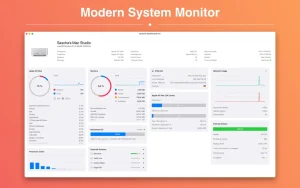
System Dashboard Pro is a modern interpretation of the system dashboard, offering more information than ever before. The app has been completely redesigned and optimized for the latest systems.
System Dashboard Pro offers the following features:
• General system information Get an overview of the most important settings for your system. This includes, for example, the version of macOS you’re using or information about your computer.
• Processor Usage: The Processor panel displays important information about your processor usage. It displays the current load as well as the load over the last few seconds. A list of processes with the highest processor load is also displayed.
• Memory Usage: The Memory panel displays memory-related data. It displays the current load as well as the load over the last few seconds. A list of the processes using the most memory is also displayed.
• Network Information This panel displays basic network information, such as the local and external IP address or the data transfer rate of the WLAN connection.
• Network Usage: The Network category displays your current download and upload speeds, as well as the number of open connections.
• Internal Battery. This panel is available when the app is running on a MacBook and displays basic battery information. Among other information, it displays the number of charge cycles and battery health.
• Hard Drive This panel allows you to monitor your computer’s hard drive. It shows how much space is used and how much is free. The current speed is also displayed.
iDownerGo 10.15.0 Video Downloader and Music Converter for Mac
iDownerGo is an all-in-one video downloader and music converter for Mac developed by iDownerGo Studio, and version 10.15.0 is the latest release in a rapidly evolving version line that has seen the app grow from 9.x to 10.15 in a short span reflecting active and continuous development throughout 2026.
What is iDownerGo?
iDownerGo lets you download videos, music, and entire playlists from over 10,000 websites and save them locally for offline viewing or listening. The workflow is simple paste a URL or use the built-in browser to find the video, choose your output format and quality, and start the download. It supports video in resolutions up to 4K and 8K, and can extract audio from any video and save it directly as MP3, AAC, WAV, or FLAC in one click.
The app covers a wide range of platforms including Facebook, Instagram, TikTok, Dailymotion, Bandcamp, Vimeo, and thousands of other open web video sources. For music, it also supports downloading from streaming platforms including Spotify, Apple Music, Tidal, Deezer, and SoundCloud.
Key Features
Batch downloading lets you pull entire playlists or channels in one pass instead of downloading files one by one. Live stream recording captures streams in real time so you can watch them later without buffering. The built-in browser makes it easy to browse video sharing sites directly inside the app and trigger downloads without copying and pasting links manually. A Private Mode protects downloaded content with a password, keeping videos and audio from being accessed without authorization.
Output formats include MP4, MOV, MKV, 3GP, AAC, WAV, and FLAC, covering virtually every common use case for saved media. The app claims up to 10x faster download and conversion speed compared to free online tools, and lets you adjust speed according to your available bandwidth. There are no watermarks and no ads in the downloaded content.
Pricing and Compatibility
iDownerGo is available from the developer’s website with a free trial. It requires macOS 10.10 or later and runs on both Intel and Apple Silicon Macs, making it compatible with a very wide range of Mac hardware.

Parallels Desktop 27.0.0-58597 (Beta) ARM only for Mac

Zenteek 1.6.2 for Mac

Widgetter System Stats Widgets 2.4.1 for Mac
About Author
