Internet Status 5.9 for Mac
Internet Status 5.9 for Mac
Internet Status provides information about your internet connection from the menu bar. Its icon indicates the connection status and opens to display other parameters, such as your IP address, download speed, and more.
Peculiarities:
– Get alerts in the notification center with custom sounds.
– Shows your public and local IP address.
– Current download/upload speed.
– Export connection status report with date and time in .txt format.
– Works with MacBook Air, MacBook Pro, iMac, MacBook, MacPro, Mac Mini.
– Shows network speed and data usage for the current session.
– View connection status with color or monochrome icons.
– Displays the current data transfer speed (download/upload).
– Shows the name of the connected Internet (WiFi).
– Show total internet data usage since system startup.
– Reset Internet data usage history.
– Get your computer’s public IP address and simply click to copy it.
– Icons with support for Apple’s dark themes, included with Retina Display.
– Option to change the color of the status bar icon from monochrome to color.
– You can select an icon for the menu bar from a set of icons.
– Set custom sound alerts.
– May add a delay to the connection alert.
Internet Status 5.9 for Mac Know Your Connection at a Glance
Your Mac might show Wi-Fi connected, but is the internet actually working? Internet Status answers that question instantly right from your menu bar.
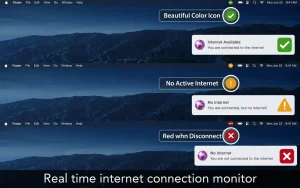
Internet Status is a small menu bar utility from AppYogi Software that shows whether your Mac actually has working internet not just whether Wi-Fi is connected. After launch, the app lives in the menu bar with a green, yellow, or red icon. Green means an active internet connection, yellow means the Mac is on a network but without usable internet, and red means no connection.
What’s New in Version 5.9
Version 5.9 brings improved performance along with bug fixes to enhance the overall experience.
Key Features
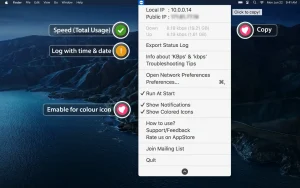
Everything at One Click Click the icon to see your public and local IP, current upload and download speeds, the Wi-Fi network name, and session data usage since the Mac started useful when video calls drop, downloads stall, or you’re not sure if the problem is your router, VPN, or the Mac itself.
Smart Alerts Custom notifications and sounds alert you when connectivity drops or returns, which is especially handy on unstable Wi-Fi or when the Mac wakes from sleep.
Quick IP Copy Public and local IP display with one-click copy is useful for VPN checks, remote support, and router configuration.
Customizable Menu Bar Icon You can launch it at login, switch between colored and monochrome menu bar icons, and choose from several icon styles to match your preferences.
Price: $0.99 (Family Sharing supported) Compatibility: macOS 10.11 or later, works on Intel and Apple Silicon
At just $0.99, Internet Status 5.9 is one of the most practical and affordable little utilities you can add to your Mac small in size, but genuinely useful every single day.

ForkLift 4.6.0 for Mac

inKONBINI: One Store. Many Stories v1.0.240.0 fix for Mac

ON1 Effects 2026.3 v20.3.1.18535 for Mac
About Author
