RightFont 10.0.0 for Mac
RightFont 10.0.0 for Mac
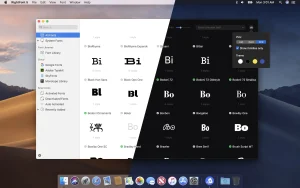
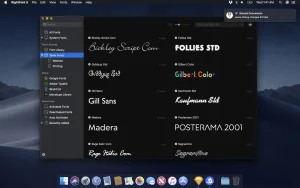
RightFont is a lightweight font manager for Mac with a simple, beautiful interface. It offers a variety of features to help you easily manage all your local fonts.
Key Features or Capabilities:
Font Library. Now you can organize fonts in the library and move them anywhere for font sharing or backup.
Access font management at any time directly from the menu bar
Creating and managing font lists
Direct access to fonts in Adobe Creative Cloud (Photoshop, Illustrator, InDesign, Flash, AfterEffect), Sketch, etc.
Instant search results as you type
Easily filter fonts by classification (Sans Serif, Serif, Script, etc.), font width, and font weight
Effortless integration – you can use the RightFont app with your design software. With a simple double-click, you can change the font used in your text layer.
RightFont 10.0.0 Font Manager for Mac
RightFont 10.0.0 is the biggest release in the app’s history. Developed exclusively for macOS, this major update, released on June 2, 2026, rebuilds core parts of the app from the ground up to deliver a faster, more flexible, and more refined font management experience for designers and creative professionals.
What is RightFont?
RightFont is a professional font manager built exclusively for Mac. It lets designers organize, preview, activate, and share font collections with a clean and lightweight interface. It integrates directly with Adobe Creative Cloud apps Photoshop, Illustrator, InDesign, and InCopy as well as Affinity, QuarkXPress, and Sketch, automatically activating missing fonts when you open a document so you never hit a missing font warning mid-project. It also connects to Google Fonts and Adobe Fonts, letting you browse, sync, and manage those libraries locally alongside your own collection.
What’s New in 10.0.0
The headline addition is folder browsing you can now add folders directly to RightFont and browse and organize fonts from their existing locations on disk without importing them into a library first. This is a long-requested feature for designers who prefer to keep their fonts organized in their own folder structure.
The Import Fonts workflow has been completely redesigned with two powerful new options: Create Sets from folders automatically builds font sets that mirror your folder structure on import, and Create new libraries during import lets you set up a new library in one step. These make onboarding a large font collection significantly faster and more organized.
Preview Text Editor is another standout addition you can now save, edit, and quickly switch between custom preview presets, so you can jump between pangrams, alphabet sets, project-specific text samples, or any other preview strings instantly. The Inspector now also lets you edit the font preview directly rather than switching to a separate field, and a new Font Sizes tab for Waterfall preview makes it easier to check how a font scales across sizes.
List View is now fully customizablecolumns can be added, removed, and reordered to show exactly the metadata you care about. A new OpenType Features tab in the Font Inspector gives a clear view of a font’s OpenType capabilities. Nested Tags have been added for deeper font organization, and the entire app has been deeply integrated with the macOS 26 design language for a more native and modern feel.
On the performance side, loading lar ge font libraries is significantly faster, Google Fonts importing and synchronization is considerably quicker, and Google Fonts now syncs variable fonts by default, which substantially reduces storage usage compared to downloading all font weight files separately.
Pricing
RightFont is available directly from rightfontapp.com with a free trial. A subscription license covers ongoing updates and is priced per year, with a perpetual license option also available. It requires macOS 12.0 or later and runs natively on both Intel and Apple Silicon Macs.

Capture One Pro v16.7.8.16 for Mac

Nova Roma v0.7.2011 for Mac

Elmedia Video Player Pro 8.24 for Mac
About Author
