Elmedia Video Player Pro 8.24 for Mac
Elmedia Video Player Pro 8.24 for Mac
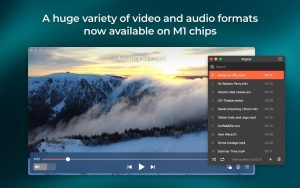
Elmedia is a multi-functional media player for macOS that supports a wide range of file formats, including most video and audio formats. Supported file types include FLV, SWF, WMV, AVI, MOV, MP4, MP3, DAT, FLAC, M4V, MPG, and MKV. Not only does it support multiple formats, but it also offers a variety of features, such as a built-in web browser and the ability to watch online videos directly within the player.
Finding the right app for playing HD video on a MacBook Pro and other Mac computers isn’t a difficult task, though it can be challenging if you need a truly reliable player that can handle any file type and deliver truly stunning performance. Elmedia Player delivers perfectly smooth HD playback with hardware-accelerated decoding (a powerful feature that offloads the processor, resulting in smoother and more accurate playback and sound).
Since Elmedia’s screenshot capture is optimized for video playback, you can capture precise stills of the exact moments you need. The resulting images can be saved in TIFF, PNG, or GIF formats.
Elmedia Player PRO’s compelling feature set includes features such as downloading online videos, their audio tracks, RTMP streams, and animations; converting Flash EXE files to SWF; taking screenshots of playing videos, and more.
Downloading videos is super easy with Elmedia Player PRO: switch to browser mode, find your favorite online video, and click “Download.” If the video is embedded on another website, you’ll see a download link even without playing the video. Subtitles, if any, will download along with the video. You can even download an entire YouTube playlist in your preferred format!
Instead of downloading the entire video, you have the option to save just the audio. When all you need is the audio track, let Elmedia save you time and disk space by saving it as an MP3 or M4A file.
Elmedia Player offers extensive AirPlay support. You can stream video from your Mac running Elmedia to other AirPlay devices, and from your Mac running Elmedia to them. You can also stream from any of your AirPlay devices to Elmedia Player Pro on your Mac.
Select your audio output device—headphones, speakers, or other. Elmedia also lets you set the number of channels used: two, four, or eight. For DVDs encoded in AC-3 (Dolby Digital) or DTS (Digital Theater System), you can configure the audio retransmission option without decoding. This works if your sound card has an S/PDIF (Sony/Philips Digital Interface) port or if you’re sending audio via HDMI.
Elmedia Player PRO’s sought-after PRO features include downloading online videos, saving their audio tracks, RTMP streams, and animations; converting Flash EXE files to SWF; creating screenshots of the currently playing video, and more.
Elmedia Video Player Pro 8.24 for Mac The Only Video Player You’ll Ever Need
If you’re tired of switching between multiple apps to play different video formats, Elmedia Video Player Pro is the one app that handles everything beautifully on Mac.
Elmedia Player Pro combines precision, flexibility, and elegant design to give you total control over how you watch, listen, and stream built for Mac and perfected for performance.
What’s New in Version 8.24
Version 8.24 adds support for M4B audiobook files, improves compatibility with macOS 26, prevents your Mac from sleeping while streaming, fixes streaming to certain devices, and resolves errors when opening the list of devices for streaming.
Key Features
Wide Format Support & 4K Playback Elmedia supports smooth 4K and 8K video playback without slowdowns or audio sync issues, thanks to hardware accelerated decoding.
Stream to Any Device Elmedia can detect AirPlay-enabled devices on the same network and stream video directly to them. It also supports Chromecast, DLNA, and Roku for a fully flexible streaming experience.
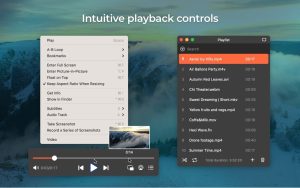
Subtitles & Audio Control Elmedia offers versatile subtitle support, the ability to load external audio files, and options to increase or decrease audio delay. A 10-band equalizer lets you shape the audio tone, while the video tuner adjusts brightness, saturation, and contrast.
Picture-in-Picture & More Keep your video floating on top while you browse, work, or chat. You can also rotate, flip, or mirror videos with a single click, and play on any connected screen for a distraction-free experience.
Dolby & DTS Support Choose audio output devices, switch between audio tracks, and enjoy detailed sound with full Dolby and DTS support.
Compatibility: macOS 10.13 or later
Whether you’re watching 4K movies, streaming to your TV, or listening to audiobooks, Elmedia Video Player Pro 8.24 is a polished and powerful media player that Mac users will genuinely love.



About Author
