Presentify 8.0.6 for Mac
Presentify 8.0.6 for Mac
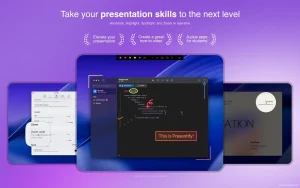
Presentify is an app that helps you improve the quality of presentations, online lessons, and video tutorials by allowing you to add annotations to any screen, highlight the cursor, and much more.
You can annotate anything on the screen, be it images, videos, PDFs, code—anything. Presentify is incredibly useful for online teaching, recording video tutorials, conducting demonstrations, remote work, and more.
Peculiarities:
Annotations
– You can draw or annotate any screen. Select “Screen Annotations” in the menu bar and start drawing.
– Lots of shapes to draw. Now you can even write text.
– Draw with random gradient colors instead of normal colors.
– Automatically erase annotations. Perfect for highlighting specific points or clarifying your thoughts. You can also toggle this feature by pressing the Control key.
– You can draw even when other apps are running in full-screen mode. Perfect for live presentations and video calls when working remotely.
– New Interactive Mode: It opens Presentify in the background, allowing the user to use other apps and add annotations by pressing and holding the Fn key.
– Users can now interact with native apps while annotating (in default mode) in Presentify. To do this, simply press and hold the Fn key. You no longer need to switch to Presentify to advance presentation slides, play/pause videos, etc.
– The selection function allows you to select fragments of text without overlapping them.
– To draw a straight line, press and hold the Shift key while drawing. You can also fill rectangles and circles with a semi-transparent color by pressing and holding the Option key.
– Works with Keynote (even in presentation mode).
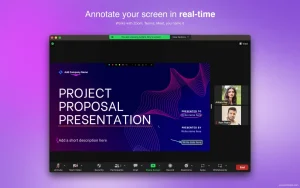
– Compatible with all video calling programs such as Zoom, Google Meet, Skype, etc.
– Works with graphic tablets such as XP-Pen, Wacom, etc.
Presentify 8.0.6 for Mac Present Like a Pro, Every Single Time
Great presentations aren’t just about what you say they’re about where you look. Presentify is the beautifully simple macOS menu bar app that transforms the way you present, teach, and demonstrate on screen. Recommended by Harvard and MIT professors, featured by Apple three times, and trusted by educators, developers, and creators worldwide Presentify 8.0.6 is the sharpest version yet.
What Is Presentify?
Presentify sits quietly in your menu bar and springs into action the moment you start presenting. It lets you annotate any screen, highlight your cursor, spotlight key areas, and zoom in all without switching apps or interrupting your flow. Whether you’re on Zoom, Teams, Keynote, or recording a tutorial Presentify makes sure your audience always knows exactly where to look.
Key Features
Annotate Anything, Anywhere Draw, highlight, and write directly on top of any app on your screen images, videos, PDFs, code, slides, anything. Choose from shapes, arrows, text, and freehand drawing in any color, opacity, or gradient. Multi-screen support means you can annotate across all connected displays at once.
Cursor Highlight Your mouse pointer is tiny your audience shouldn’t have to hunt for it. Presentify adds a customizable glowing ring around your cursor so every viewer can effortlessly follow your every move. Adjust the color, size, and opacity to match your style.
Spotlight Mode Focus your audience’s attention on exactly what matters. Spotlight Mode dims everything except the area you want to highlight like a stage spotlight, right on your screen.
Zoom In Need to show fine detail? Presentify lets you zoom into any part of your screen in real time no awkward scrolling or resizing needed.
Interactive Mode Use the Fn key (or Caps Lock) to instantly switch between annotating and interacting with your apps. Advance your Keynote slides, play/pause videos, and draw arrows all without toggling modes manually.
Whiteboard & Custom Boards Stop annotating on top of other apps and draw on a clean white, green, or custom-colored board instead perfect for live explanations, math problems, or diagrams.
Apple Pencil & Drawing Tablet Support Pair your iPad via Sidecar or Astropad and draw with your Apple Pencil. Or connect a Wacom or XP-Pen tablet Presentify works with all of them.
Undo/Redo & Custom Shortcuts Every annotation is fully reversible with Undo/Redo. All actions have customizable keyboard shortcuts, and Presentify works seamlessly with Stream Deck for instant one-button control.
Works With Everything
Presentify integrates perfectly with: Zoom, Microsoft Teams, Google Meet, Keynote, PowerPoint, OBS, QuickTime, and more — compatible with every app that lets you share your screen.
Pricing & Compatibility
- Available on the Mac App Store and included in Setapp
- Requires macOS 11.0 or later
- Supports both Apple Silicon and Intel Macs



About Author
