EdgeView 5.7.9 for Mac
EdgeView 5.7.9 for Mac
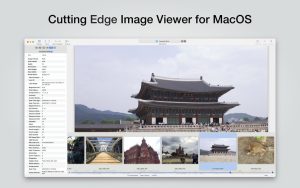
EdgeView 3 is a fast image viewer with an elegant user interface. Designed and developed for modern macOS, EdgeView 3 can open a variety of image files, including JPEG, PNG, TIFF, BMP, and DSLR RAW files, EPS, PDF, and AI (Adobe Illustrator). You can also open archived image files directly without extracting them.
The user can open, rename, and delete files from the EdgeView file browser. Network volumes can also be accessed via SMB/AFP/FTP.
Users can quickly navigate images using keyboard shortcuts, mouse wheel, and trackpad gestures. EdgeVew displays EXIF information and smoothly plays GIF/PNG/WebP animations. Save the last view in the history and restore it when reopening the file.
EdgeView 3 will be your best choice when viewing and managing image files.
Peculiarities
Complete code rewritten in Swift to improve performance.
Support for the m1 Mac processor.
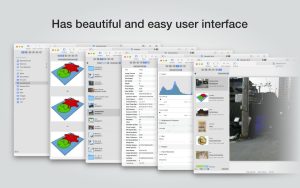
It has a simple user interface and can control the main functions on the sidebar.
Support English/Korean/Japanese/Chinese (Simplified) languages.
View images
Support image files such as JPG, GIF, BMP, PSD, TIFF, RAW, WEBP and PDF, EPS, AI (Adobe Illustrator), OpenEXR, HDR, TGA.
Can play GIF/PNG/WebP animations. The user can control the animation using the floating animation controller.
Display an inner image (or frame) of a GIF/PNG/WebP or HEIC animation that has multiple inner images.
It can read and display images of major archive formats (such as ZIP, RAR, CBZ, CBR, and 7-zip) without extracting. Of course, it can open ZIP files larger than 4 GB.
Can read encrypted archive file.
Can recursively read an archive file within an archive file
Rendering speed has been increased thanks to a rebuilt image caching system and rendering engine.
We draw images of the highest quality.
Provide suitable features for reading comics, such as “Double Page Spread”, “Continuous Scrolling Mode”, “Right to Left”, etc.
Provide multiple navigation functions such as Move, Skip, Shift, etc.
The user can navigate through images and inspect full thumbnails in the thumbnail panel.
The user can navigate through the images using keyboard shortcuts, mouse wheel, and trackpad gestures.
You can rotate and flip images. The orientation will be saved in the history.
The user can select a part of the image and copy it or save it as a file.
You can freely zoom in/out the image.
Built-in magnifying glass function for easy enlargement of a part of an image.
Show histogram.
Show a list of nearby files. And can open a nearby file.
Support history function to save and restore the latest file status.
You can reopen the file or delete the history in the history list.
Can rate image files.
File browser
The built-in file browser can display and open files from local disk or AFP/SMB/FTP network disk.
Can display files as lists or icons.
Show images in folder/archive file in preview pane.
Create thumbnails of archived files and folders.
Support powerful search function.
Show category and writer information.
The user can sort files by various parameters, as well as delete or rename files.
You can rate files or folders.
Other
Customization support. The user can also change shortcuts.
The built-in Quick Look extension generates thumbnails and previews of archived files in Finder.
EdgeView 5.7.9 for Mac The Fast, Elegant Image Viewer You’ve Been Looking For
macOS’s built-in Preview is fine for basic tasks but when you need a faster, smarter, and more versatile image viewer, EdgeView is the answer. Developed by Dongjin Han (DJ.HAN), EdgeView is a beautifully designed image viewer built from the ground up for modern macOS rewritten entirely in Swift for maximum performance. Version 5.7.9 is the latest release, polished and ready for every image viewing task you can throw at it.
What Makes EdgeView Special?
Blazing Fast Performance EdgeView’s entire codebase was rewritten in Swift with a rebuilt image cache system and drawing engine resulting in dramatically faster load times and buttery-smooth image rendering, even with large, high-resolution files.
Supports Virtually Every Image Format EdgeView handles an impressive breadth of file formats in one elegant app:
- Standard formats: JPEG, PNG, GIF, BMP, TIFF, WebP, HEIC
- Professional formats: PSD (Photoshop), EPS, PDF, AI (Adobe Illustrator), OpenEXR, HDR, TGA
- RAW files: From DSLR cameras of all major brands
- Animations: GIF, PNG, and WebP animations with a floating animation controller
Browse Archives Without Extracting One of EdgeView’s most loved features open and browse images inside ZIP, RAR, CBZ, CBR, and 7-Zip archives directly, without extracting a single file. Even ZIP files over 4GB and encrypted archives are fully supported.
Smart File Browser EdgeView includes a built-in file browser sidebar for navigating your entire file system open, rename, and delete files without ever leaving the app. You can also access SMB, AFP, and FTP network volumes directly, making EdgeView perfect for studio and server-based workflows.
Smooth Navigation Browse through images instantly using keyboard shortcuts, mouse wheel, or trackpad gestures whichever feels most natural to you.
EXIF Information View full EXIF metadata for any photo camera model, shutter speed, aperture, ISO, GPS location, and more right alongside your image.
Comic & Magazine Support EdgeView handles CBZ and CBR comic book archives natively making it a fantastic reader for digital comics and photo magazines too.
History & Session Restore EdgeView saves your last viewed position and restores it automatically when you reopen a file so you always pick up exactly where you left off.
Multi-Language Support EdgeView supports English, Korean, Japanese, and Simplified Chinese making it accessible to a global audience.
Pricing & Compatibility
- Price: $6.99 one-time purchase on the Mac App Store
- Requires macOS 11.1 or later
- Supports both Apple Silicon and Intel Macs Universal Binary



About Author
