Wins 3.4 for Mac
Wins 3.4 for Mac
Wins is a macOS application designed for window management and productivity.
Window Management: Allows users to easily resize and arrange windows on the screen, making multitasking easier.
Saving Layouts: You can save your custom window size and position combinations, allowing you to quickly restore your settings.
Group Work: Supports the creation of window groups, making it convenient for working with multiple applications at the same time.
Hotkeys: The program offers the ability to customize hotkeys for quick access to various functions, which significantly speeds up the workflow.
Program Features:
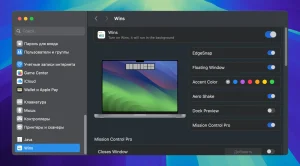
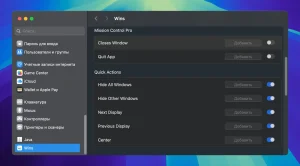
– Mission Control Pro: Improved Mission Control. Quickly closing windows with 96+W or quitting apps with I+Q in Mission Control is now supported.
– Preview windows in the Dock.
– Shake the window to hide other windows.
– Excellent animations.
– Floating split window
– System-level integration
– Move windows to another display
– Hide other windows using a hotkey
– Quickly split windows.
– Hide all windows.
Wins 3.4: A Smarter Way to Manage Windows on Mac
Keeping track of multiple open windows has always been one of the small frustrations of working on a Mac. Wins 3.4 is a window management utility built specifically to solve that problem, letting users snap, switch, and arrange windows more efficiently than macOS does on its own.
Snap Island The Standout Feature
The headline addition in this release is a gesture-driven window layout system where dragging a window toward the top center of the screen, near the notch or menu bar, brings up a visual overlay for instantly choosing a tiling layout such as left half, right half, or quadrants. It’s designed to feel like a native part of macOS rather than a bolted-on tool.
System-Level Integration
Rather than running as a separate app with its own window or menu bar icon, Wins integrates directly into System Settings, aiming for a clean, distraction-free experience. Other features include Cmd-Tab Plus, Dock previews, Mission Control Pro, customizable shortcuts, multi-display support, and dark mode.
Performance and Compatibility
Efficiency is a key selling point: the app uses less than 30MB of memory and typically around 0.1% CPU, so it shouldn’t noticeably affect system performance. It runs on macOS High Sierra (10.13) and later, including the newest macOS Tahoe, with native support for both Apple Silicon and Intel Macs.
Licensing and Pricing
Wins is sold under three license tiers Single, Pro, and X allowing activation on 1, 3, and 5 Macs respectively, all as lifetime licenses with future updates included. Pricing starts around $11.99/month on the Single tier, scaling up to $29.99/month for higher tiers, though a free trial is available before committing.
Reception
The app launched on Product Hunt on July 1, 2026, earning 79 upvotes and 25 comments, landing at #30 on the daily leaderboard.
Privacy
For users concerned about data collection, Wins is positioned as privacy-focused: it’s GDPR compliant, works entirely locally, requires only Accessibility and optional Screen Recording permissions, and does not collect telemetry or personal data.
Overall, Wins 3.4 competes in a crowded space alongside tools like Magnet, Rectangle, and BetterSnapTool, betting on its notch-based Snap Island interaction to stand out.



About Author
