Metadatics 1.6.15 for Mac
Metadatics 1.6.15 for Mac
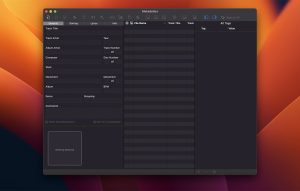
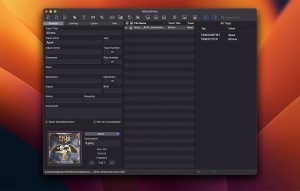
Metadatics is a powerful and advanced audio metadata editor. It supports batch editing of the most common audio file types, including MP3, M4A, AIFF, WAV, FLAC, APE, OGG, WMA, and many others.
Provides the ability to search metadata from online sources, rename files based on metadata, or manipulate metadata using one of the many built-in functions. Metadatics provides everything you need to edit metadata with ease and flexibility.
Supports reading and writing multiple samples in a single file. Images can be extracted from files and saved as separate image files.
Metadatics 1.6.15 for Mac Fix Your Music Library, Once and for All
A messy music library is one of the most quietly frustrating things on a Mac. Missing album art, wrong track numbers, blank artist names, inconsistent genres it all adds up. Metadatics by Mark V Apps is the powerful, elegant audio metadata editor that cleans up all of it fast, in bulk, and with total precision. Version 1.6.15, released on March 31, 2026, is the latest and most refined build of this indispensable Mac app.
What Is Metadatics?
Metadatics is a professional audio metadata (tag) editor built exclusively for macOS. Whether you have 100 files or 100,000, it lets you edit, fix, and organize the tags on every audio file in your library — quickly, accurately, and beautifully.
Key Features
Batch Editing — Edit Thousands at Once Edit multiple audio files at once quickly and easily. Whether you need to edit metadata in 1 or 10,000 files, Metadatics handles your needs with ease.
Powerful Built-In Functions Metadatics has a number of built-in functions to quickly manipulate metadata replace text, remove characters from the beginning or end of a tag, generate a sequence of numbers, copy from tag to tag, and much more.
Online Metadata Lookup Look up album and track metadata, plus album artwork, from online sources. Preview your changes before anything is written to your files, choose between multiple album releases when more than one matches, and align lookup results with your existing tags. Sources include MusicBrainz, iTunes API, Amazon, and Discogs.
Full Album Artwork Support Metadatics has full support for album artwork, including multiple images. Artwork can be extracted and saved as a separate image file. You can also search for artwork from online sources including the iTunes API and Discogs.
Smart File Renaming Rename files and generate full directory structures from any combination of your tags for example, Album Artist / Album / 01 – Track Title. Rename in place or copy to a new location, automatically replace characters that are invalid on Windows or network shares, pad track numbers, and preview every rename before committing.
Broad Format & Tag Support Metadatics supports reading and writing ID3v1, ID3v2, MP4, Vorbis, APE, and ASF tags all from a variety of audio file types including MP3, M4A, AIFF, WAV, FLAC, APE, OGG, WMA, and more.
What’s New in v1.6.15?
Version 1.6.15 removes Google Images from the album artwork search, while adding additional artwork sources keeping the artwork lookup experience cleaner and more reliable than ever.
Pricing & Compatibility
- Available on the Mac App Store
- Requires macOS 10.13 or later
- Supports both Apple Silicon and Intel Macs



About Author
