Dropover 5.2.4 for Mac
Dropover 5.2.4 for Mac
Dropover is a handy utility that simplifies the process of dragging and dropping files, folders, and other items on your Mac. It creates a temporary “zone” on your screen where you can easily drag and drop files, keeping them within easy reach while you work with other apps or windows.
Temporary file storage:
Drag files into the Dropover zone, and they’ll stay there until you’re ready to use them. This is especially useful if you work with multiple windows or applications simultaneously.
Convenient organization:
You can group files in the Dropover zone to keep them organized before further actions such as copying, moving, or downloading.
Quick Actions:
Dropover allows you to perform various actions on files directly from the zone, such as archiving, renaming, or sharing them.
Integration with other services:
The program supports integration with cloud services such as Google Drive, Dropbox, and others, making it easy to upload files to the cloud.
Flexible settings:
You can customize the appearance of the Dropover zone, including its size, transparency, and position on the screen.
Hotkey support:
For convenience, Dropover supports hotkeys, which speeds up work with the program.
Dropover Benefits:
Simplifies multitasking by keeping files at hand.
Saves time when working with large numbers of files.
Intuitive interface that is easy to learn.
Dropover is ideal for users who frequently work with files and want to optimize their workflow.
Release notes are available on the official website dropoverapp.com
Dropover 5.2.4 The Smarter Way to Drag and Drop on Mac
Dropover is one of those small Mac utilities that quietly makes your daily workflow noticeably smoother. Developed by Damir Tursunovic, version 5.2.4, released on June 2, 2026, is a focused maintenance update that follows the significant 5.2.0 release which brought some of the biggest additions to the app in recent memory.
What is Dropover?
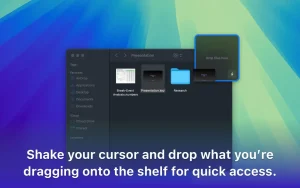
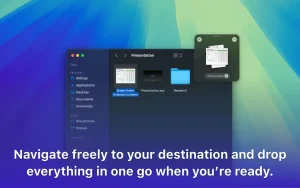
Dropover adds temporary floating shelves to your Mac for drag and drop. Instead of juggling multiple Finder windows to move files from one place to another, you shake a file with your mouse or trackpad, a shelf appears right where you need it, and you drop your files, folders, links, images, or text onto it. When you are ready, you drag everything to the destination in one go. Shelves can be named, color-coded, docked to screen edges, and closed when you are done. It is one of the simplest solutions to a genuinely frustrating everyday Mac problem.
What the 5.2 Series Brought
Version 5.2.0 was a significant release. It added Control Center controls for macOS Tahoe letting you open a shelf, create a clipboard shelf, or dock all visible shelves directly from Control Center or the menu bar without interrupting what you are doing. Instant Actions, a longtime favorite feature for quickly processing dropped files, received a full redesign with a refreshed interface and more flexible options. The app icon was also updated for macOS Tahoe with dark mode support and clear and tinted variants. Dropover Cloud uploads were expanded to support up to 100 individual files, with larger batches automatically zipped before uploading.
What’s New in 5.2.4
This release fixes three specific issues. Dropover Cloud was incorrectly reporting that users had reached a maximum file count even when they had not that is now resolved. Some Siri Shortcuts were unexpectedly opening Dropover’s Settings instead of executing the intended action, which has also been fixed. The Settings window now shows a notice when a newer version of the app is available, so you no longer have to check manually.
Pro Features
The core app is free with a 14-day full trial. Dropover Pro unlocks Shortcuts integration, folder monitoring, Share Extension support, custom actions, and the Command Bar. It is a one-time purchase at $6.99 with no subscription.



About Author
