Default Folder 6.2.8 for Mac
Default Folder 6.2.8 for Mac
The Open and Save dialog boxes included by default in macOS don’t offer many customization options. Default Folder X is a small utility that helps you personalize the entire process by adding new locations, Spotlight tags, comments, and many other options.
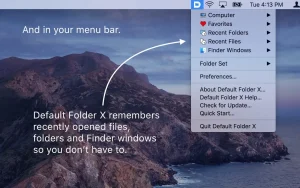
Access your favorite folders from the status bar and create your own folder lists. The “Default Folder X” status bar menu lets you navigate to your default, favorite, and recent folders. The menu also lets you view all open Finder windows and bring any one to the foreground.
Default Folder X can be customized using the settings panel, which will be added to your system preferences. Here, you can add specific directories to be used by default with specific applications. You can also create your own list of favorite folders.
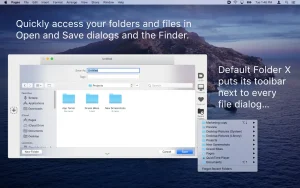
Open and Save Toolbar If Default Folder X is running, every time you want to save or open a file using a built-in macOS utility, the app will add a toolbar that provides all of those options in a more accessible form.
To navigate between different menus, simply hover your mouse over them. However, you can also use the default keyboard shortcuts assigned to frequently used functions.
Integrated Spotlight and QuickLook options To help you find your files as quickly as possible, the default folder X allows you to add keywords, tags, comments, or Spotlight labels in the Save dialog box.
On the other hand, when you open files, the default X folder allows you to view documents as thumbnails and even enlarge them to full size.
An intuitive solution for customizing the default Save and Open dialog box. Default Folder X offers simple solutions for personalizing your experience when opening or saving files. The app is focused on efficiency and is sure to improve your workflow.
Default Folder X 6.2.8 for Mac: Fixing Tahoe’s Open and Save Dialogs
Few Mac utilities have stuck around as long, or earned as much loyalty, as Default Folder X. Built by St. Clair Software, the app has spent over two decades fixing and extending the Open and Save dialogs that nearly every Mac application relies on. Version 6.2.8 keeps that streak going, with a fix aimed squarely at the latest version of macOS.
What Default Folder X Does
Default Folder X attaches an extra toolbar to the right side of standard Open and Save dialogs across virtually any Mac-native application, from Photoshop to Word. From that sidebar, users can jump straight to favorite folders, recently used locations, or any currently open Finder window, instead of clicking through column views one level at a time. The app also remembers per-application default save locations, so each program can automatically return to the folder where it’s typically used.
Beyond navigation, the app patches a handful of long-standing quirks in macOS’s own dialogs: it “rebounds” to the last file selected in an app, restores the path listing to the top of the window, and corrects scrolling bugs in column view. A menu-bar icon mirrors the same shortcuts even when no dialog is open, and a Quick Search command lets users type a few letters to jump straight to a recent document or folder. Files can also be previewed, renamed, duplicated, tagged, or deleted directly from within an Open or Save sheet, without needing to switch to the Finder.
What’s New in 6.2.8
Version 6.2.8 specifically addresses a macOS Tahoe bug that left column view scrolled all the way to the left in Open and Save dialogs, forcing users to manually scroll horizontally every time they opened a file picker. The release also fixes Save-sheet folders that previously required an awkward double double-click to open, restores missing OneDrive for Business paths from the recent items list, and resolves several crash paths that could occur in large hierarchical menus.
The update additionally restores Finder-click compatibility with Path Finder 26 after changes to CocoaTech’s underlying API had broken that integration, and it adds pane-aware clicking support in Bloom when that app’s “Enable Precise Location Detection” setting is turned on. One notable change: playable audio and video previews in Open dialogs are now disabled by default, because Apple’s AVPlayer framework has been crashing frequently on macOS 26.4 Tahoe and later. Users who want previews back can re-enable them by Option-clicking Settings in the Default Folder X menu, accepting the stability tradeoff.
Pricing and Requirements
Default Folder X runs on macOS 10.13 through the current 26.5 release, on both Intel and Apple Silicon Macs. A single-user license costs $39.95 to $47.94 depending on the source, sold as a one-time purchase with a 30-day trial; all updates within the version 6 line are free for existing owners. The app is also bundled with a Setapp subscription.



About Author
