SponsorBlock for YouTube 6.1.5 for Mac
SponsorBlock for YouTube 6.1.5 for Mac
SponsorBlock lets you skip sponsored inserts, intros and outros, subscribe requests, and more in YouTube videos.
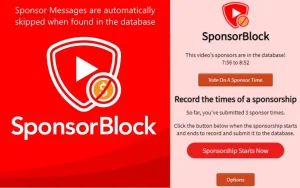
SponsorBlock is a collaborative extension that allows anyone to submit the start and end times of similar segments in a video. Once someone submits this information, all other extension users will automatically skip these segments. You can also skip sections of clips without music.
– Fix options page disappearing if all custom configurations are deleted – Improved channel lookups (thanks @mini-bomba) – Add support for new embed player – Fix segments not skipping when video is scrolled away
SponsorBlock for YouTube 6.1.5 for Mac — Skip the Fluff, Watch What Matters
How many hours have you wasted watching YouTube sponsors, long intros, subscription reminders, and self-promotion segments you never asked for? SponsorBlock is the open-source extension that gives you those minutes back — automatically, silently, and brilliantly. Version 6.1.5, updated on April 21, 2026, is the latest release of the world’s most popular YouTube segment-skipping tool.
What Is SponsorBlock?
SponsorBlock is a crowdsourced browser extension that automatically skips over unwanted segments in YouTube videos. Anyone can submit the start and end times of sponsored segments — and once submitted, every other SponsorBlock user skips right over them without lifting a finger. The more people use it, the smarter and faster it gets.
It’s completely open source, the entire database is public, and it works across Chrome, Safari, Firefox, Edge, and Opera making it available on every Mac browser.
What Can It Skip?
SponsorBlock identifies and skips far more than just sponsor reads:
- Sponsor segments paid promotions and product plugs mid-video
- Intros repetitive channel openers you’ve seen a thousand times
- Outros end screens and thank-you segments after the content ends
- Subscription reminders “like, comment, and subscribe” calls to action
- Self-promotion creators plugging their own merch, courses, or social media
- Interaction reminders mid-video engagement requests
- Non-music sections skip talking segments in music videos and go straight to the music
- Filler & Tangents off-topic rambling that adds nothing to the video
Each category can be individually toggled so you’re always in control of what gets skipped and what doesn’t.
How It Works
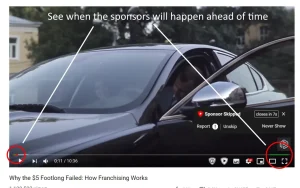
When you install SponsorBlock, it generates a random anonymous user ID no account needed, no personal data collected. As you watch YouTube, the extension silently checks its crowdsourced database for known segments in each video and skips them automatically. You’ll barely notice it working except that your videos will suddenly feel much tighter and more watchable.
You can also contribute by submitting segments yourself, vote on existing submissions, and even earn a spot on the community leaderboard.
Privacy & Transparency
- Fully open source all code is publicly available on GitHub
- No personal data collected only a random anonymous ID is generated
- Public database all submissions are open and community-verified
- No ads, no monetization completely free, forever
Compatibility
SponsorBlock 6.1.5 is available for macOS 10.14.6 or later and works with all major browsers on Mac Chrome, Safari, Firefox, Edge, and Opera. It’s available on the Mac App Store and as a browser extension on the Chrome Web Store.


About Author
