Disk Graph 3.2.1 for Mac
Disk Graph 3.2.1 for Mac
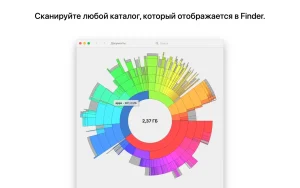
Disk Graph is a tool that lets you check your disk and easily find files that are taking up the most space. With its beautiful interface and circle-shaped graph, locating large files has never been easier.
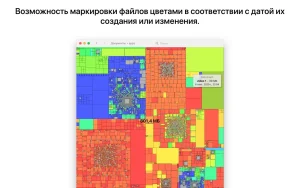
Explore your drive and find files that take up the most space or haven’t been changed in a while.
You can open any directory that is available in Finder.
Use the context menu or keyboard shortcut to show selected files in Finder or move them to the Trash.
Open two or more similar catalogs to watch them change in interactive animation mode, or take snapshots at key moments to compare them later.
Disk Graph 3.2.1 for Mac
Disk Graph, made by developer Nicolas Kick, is a lightweight utility that helps you inspect your Mac’s storage and quickly find whatever is eating up space. It presents your disk as a colorful, pie-like graph instead of a plain file list, making bulky folders and forgotten large files easy to spot at a glance.
Key Features
- Visual Pie-Chart Scanning any directory reachable in Finder — local disk, external drive, or even a remote server — can be selected and instantly analyzed
- Free Navigation dive into subdirectories with smooth animated transitions between levels
- Hover-to-Inspect move the mouse over any section to see the file’s name and size
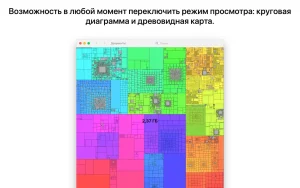
- Two View Modes switch between File Size Mode (sections sized by file size) and File Count Mode (sections sized by number of files)
- Quick Cleanup use the context menu or a keyboard shortcut to reveal files in Finder or send them straight to the Bin
- Compare Over Time open two or more similar directories side-by-side to see what changed, or export snapshots and compare them later
- Privacy-Friendly the developer collects no data from the app
What’s New in 3.2.1
Recent updates in the 3.2.x line focused on improved compatibility with macOS 26 (Tahoe) and better accessibility the graph now renders with increased contrast, reduced transparency, or reduced motion depending on your System Settings accessibility options along with fixes for a rendering glitch tied to the “Show Available Space” option and an issue where search-result folders stayed collapsed.
Compatibility & Pricing
Requires macOS 10.13 or later and is also available for iPhone and iPad. It’s a paid utility on the Mac App Store, priced at $5.99, with Family Sharing support for up to six people.



About Author
