Proxyman 6.11.0 for Mac
Proxyman 6.11.0 for Mac
Proxyman is a modern and intuitive HTTP Debugging Proxy app. Don’t let cumbersome web debugging tools hold you back. With the native Proxyman app for macOS, you can easily capture, inspect, and manipulate HTTP(s) traffic.
Key Features:
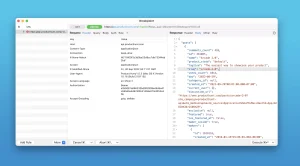
Inspect HTTP/HTTPS traffic in plain text
SSL proxy
Proxying on iOS, iOS Simulator, and Android devices
Request/Response Export
Content Filter
Body Syntax Highlighting
JSON/Tree View Format
Horizontal/Vertical Layout
Finder
Multiple Tabs
Custom Preview Tabs
Custom Header Columns
Highlight and Add Comment
MessagePack Body Previewer
JSONPath Filter
Customize Toolbar
SSL Proxy
Proxyman acts as an intermediary server that intercepts traffic between your applications and an SSL web server. With a built-in macOS setting, you can inspect your HTTP/HTTPS requests and responses in plain text with a single click.
Narrow your search with Proxyman’s multiple filters
. You can combine complex filter criteria, such as protocol, content type, URL, request header, response header, body, and more, to find exactly what you’re looking for.
GraphQL Debugging:
Easily debug a GraphQL query by defining a matching rule against a specific GraphQL query name. Works with breakpoints, Map Local, Map Remote, and the Scripting Tool.
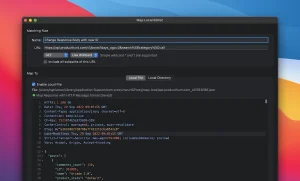
The Map Local Tool
allows developers to mock a response using a local file. Increase development speed by directly modifying the response’s status code, header, and body without waiting for the server.
Easily spot errors.
Quickly identify differences between requests and responses using the built-in Diff tool.
Zero-Setup for internal development.
One-click HTTP traffic inspection for NodeJS, Ruby, and Python.
Support for popular network libraries
NodeJS – axios, fetch (v18+), node-fetch, got, https, and superagent.
Ruby – http, net/http, net/https, httpparty, and faraday.
Python – request, aiohttp, http.client, urllib3, and httpx.
Other – cURL, httpie, ElectronJS.
Advanced Features
Proxy Helper
Local Map (File/Directory)
Remote Map
Breakpoint
No Caching
Retry Requests
Request Composing
Web Socket Debugging
Preserve Session
Blacklist
Allowlist
External Proxying (HTTP/HTTPS/SOCKS/PAC)
Protobuf
Charles Proxy File Import
Custom Root, Client, and Server Certificates
Wildcard and Regex Matching Rules
Script (Rewrite)
JS Addons and Code Snippet
Atlantis Framework for iOS
GraphQL Debugging
Network Status (Network Throttling)
Multiple Filters
Publish to Gist
Reverse Proxy
Code Generator
Command Line
Request/Response Diff
Access Control
Automatic/Manual Configuration
Proxyman 6.11.0 Mac
Proxyman is one of the best HTTP debugging tools available on Mac, and version 6.11.0, released on June 8, 2026, keeps up the fast update pace that has made it the go-to choice for developers who need to inspect and manipulate network traffic.
What is Proxyman?
Proxyman is a native macOS app written in Swift and powered by Apple SwiftNIO that lets you capture, inspect, and modify HTTP and HTTPS traffic from your Mac, iOS simulator, Android emulator, and physical devices. It supports all the essential debugging workflows breakpoints, map local, map remote, scripting, reverse proxy, network throttling, DNS spoofing, and more in a clean, modern interface that works natively on all Apple Silicon Macs.
What’s New in 6.11.0
The headline additions in this release are smarter filtering and better WebSocket tooling. Header Filters can now filter by both header name and value together for example Content-Type: application/json making it easier to zero in on specific traffic. Filter results are now highlighted in content views so matched text is immediately visible. MCP rules can now also match GraphQL query names, expanding AI agent integration.
On the WebSocket side, a Protobuf rule menu item has been added, and SOCKS CONNECT requests to IP addresses now correctly show the SNI hostname. A new popover explains response failures more clearly, and there is now a keyboard shortcut to enable SSL Proxying for a selected domain without going into settings.
Several interface refinements also landed: toolbar labels and inline buttons now shrink to fit smaller windows, the Products settings tab has been redesigned, and panel toolbar buttons on macOS 26 Tahoe have been further refined. A handful of bug fixes round out the release — including fixes for gzip decoding on some zlib streams, decoded JWT values losing slashes, broken HTML WebView previews, and a race condition when creating new flows.
A Strong 2026 Line
The 6.x series has been one of the most active update runs in Proxyman’s history. Earlier 2026 releases added npm-style require in Scripting, large session disk offloading for memory efficiency, WebSocket Compose, custom network throttling profiles, MCP rule management via AI agents, ElectronJS automatic setup, Charles Proxy CHLZ file import, and HTTP/2 beta support. Version 6.11.0 builds on all of that with more polish and precision.
Pricing
Proxyman is available at proxyman.com and can also be installed via Homebrew. It is also included in Setapp. A free tier is available with core features, and the Pro license unlocks the full debugging toolkit. It requires macOS 13 or later.



About Author
