SoundSource 6.0.6 for Mac
SoundSource 6.0.6 for Mac
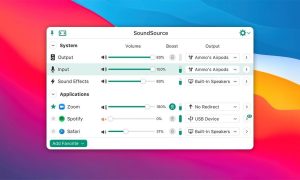
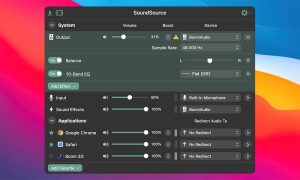
SoundSource lets you customize your device’s input, output, and sound effects, as well as volume settings, directly from the menu bar in minutes. With SoundSource, you get quick access to the most important audio settings on your Mac.
Instantly switch audio devices – With just two clicks, you can switch the audio devices your Mac uses for input, output, and even sound effects.
Fast Control Volume – SoundSource provides easy access to volume controls for audio devices.
Release notes are available on the official website rogueamoeba.com >
What’s New in 6.0.6
This is a targeted update focused on AirPods and Beats compatibility, volume overlay polish, and stability fixes:
- AirPods & Beats Head Tracking SoundSource now temporarily deactivates the Head Tracked spatial audio setting when routing audio to AirPods and certain Beats headphones, preventing conflicts
- Preferred Device Order Custom device ordering is now better maintained when AirPods or Beats headphones connect
- Volume overlay improvement The overlay now centres on the display when shown over a full-screen app, rather than appearing in the top-right corner
- Zoom audio fixed Sharing audio on a Zoom call now works correctly
- Bluetooth battery accuracy Battery level display for Bluetooth devices is now more accurate
- Crash fix Resolved a crash that occurred when switching tabs in the Settings window on macOS 15 Sequoia
Core Features
If you’re new to SoundSource, here’s what makes it worth $49:
- Per-app volume control Make one app louder, another softer, or mute it entirely independently of the system volume
- Per-app audio routing Send Spotify to your speakers while Zoom goes to headphones, all at once
- Audio effects pply built-in EQ, compression, and Audio Unit plug-ins per app or system-wide
- AirPlay streaming Route any individual app or all audio to HomePods, Sonos, or any AirPlay device
- Output groups Play audio through multiple outputs simultaneously
- Super Volume Keys Keyboard volume control that works on every output, including ones macOS ignores
- Shortcuts integration Automate audio configurations with macOS Shortcuts
“Sound control so good, it ought to be built in.” a sentiment echoed by nearly every serious Mac user who has tried it.
Pricing
SoundSource 6 costs $49 as a one-time purchase directly from Rogue Amoeba at rogueamoeba.com. It is a free update for all existing version 6 customers. Note that version 6 requires macOS 15 Sequoia or later if you’re on an older OS, SoundSource 5 is still available as a legacy download from the same site.



About Author
