ProFind 1.38 for Mac
ProFind 1.38 for Mac
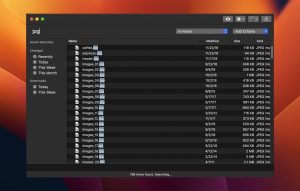
ProFind is an advanced file search app for macOS. With powerful features and high performance, it provides advanced file searches. It also supports natural language queries, app launchers, hidden location searches, scripts, and much more.
Searches inside invisible folders and packages. Searches any disk type.
Uses kernel-based search (searchfs), when available. Uses metadata indexes (used by Spotlight), when available, to improve performance. Auto-completion for application names. Large icon view for one or two search results.
With its elegant user interface, ProFind combines the power of macOS’s various search features to ensure it finds all the files you’re looking for. It’s also been carefully tuned for performance and responsiveness.
Full list of features
-Natural language search queries.
-Unlimited search results.
– Search inside invisible folders and packages.
– Searches any type of disk: Mac, Windows, servers, etc.
-Supported search locations: Home, Mac drives, local drives, servers, individual drives, open Finder folders.
-Saving and search history.
– Search by: name, creation date, modification date, file extensions, tags, parent folders, type, regular expression, wildcards, and attention metadata.
-Exclude words.
-Hashes: md4, md5, sha1, sha224, sha256, sha384, sha512. (Show additional information).
-Autocompletion for application names, command names, and keywords.
-Full, unobscured display of file paths with highlighting of path differences.
-Large icon view for one or two search results.
– Spatial disk browsing (with preservation of window position, size, scroll position)
-Support for executing shell and AppleScripts on found elements.
-Highlighting of found words.
-Sidebar with: saved searches, history, favorites, recent items, built-in search for recent downloads and recently modified files.
-Context menus: Share, Services, Open, Show in Finder, Get Info, Copy Path.
-Quick access to your favorite folders.
-QuickLook Preview.
– Supports dark mode (10.14 Mojave).
-Drag and drop from the app.
-Menu bar icon on/off.
-Fully customizable hotkey for the entire system.
-Built-in command reference.
ProFind 1.38 for Mac: Faster Paths and Smarter Queries
File search on the Mac usually means choosing between Spotlight’s simplicity and something more powerful built for people who search constantly. ProFind has positioned itself firmly in the second camp, and its latest release, version 1.38, sharpens both its navigation and its query logic.
What ProFind Does
ProFind is an advanced file search app built for speed and depth rather than casual convenience. It can search invisible folders, package contents, network volumes, and external disks without depending on Spotlight for every operation, though it does use Spotlight’s metadata indexes when they’re available to speed up certain queries. Optional disk caches index file names, sizes, and dates locally, which keeps repeated searches responsive even on slow network drives or disks that are currently offline or disconnected.
Search itself is flexible: users can rely on natural-language queries or build precise filters by name, creation or modification date, file extension, tags, parent folder, kind, regex, or wildcards, and can exclude specific words from results. ProFind also supports file hashing (MD4, MD5, SHA-1 through SHA-512) for verification tasks, autocompletion for application and command names, and a visual query editor introduced in version 1.37 for macOS 14 and later that lets users build boolean filters by clicking a pencil icon instead of typing commands. Text content search extends to PDFs, Word documents, RTF files, and InDesign files, while OCR and on-device image recognition, available on macOS 12 and later, allow ProFind to match text inside scanned documents and photos. A companion iOS app, ProFind Remote, lets users search their Mac and download files over the local network.
What’s New in 1.38
Released on June 27, 2026, version 1.38 introduces a feature called Live Directory: typing a forward slash followed by a path directly in the search field lets users browse that folder live, with results updating in real time as files change inside it effectively turning the search bar into a path explorer. The release also rounds out boolean search support with full AND/OR logic, expanding on the simpler “OR” handling from earlier versions to support more complex combined queries, documented in the app’s in-app reference. The update closes out with general stability work and minor user interface improvements.
One notable platform change: macOS 11 is now the minimum supported version starting with 1.38, meaning users still on macOS 10.15 Catalina will need to remain on version 1.37 or upgrade their operating system to get further updates.
Pricing and Requirements
ProFind requires macOS 11 or later as of this release. A 14-day trial is available either from the developer’s website, where the app costs $6.99 as a direct purchase, or through the Mac App Store, where a one-time in-app purchase unlocks full functionality once the trial period ends.



About Author
