Pixea Plus 8.1.0 for Mac
Pixea Plus 8.1.0 for Mac
Pixea is an image viewer for macOS with a pleasant, minimalist, modern user interface. Pixea works seamlessly with JPEG, HEIC, PSD, RAW, WEBP, PNG, GIF, and many other formats. It provides basic image processing, including flipping and rotating, and displays a color histogram, EXIF, and other information.
Supports keyboard shortcuts and trackpad gestures. Displays images within archives without extracting them.
Supported formats
JPEG, HEIC, GIF, PNG, TIFF, Photoshop (PSD), BMP, fax images, macOS and Windows icons, Radiance images, Google WebP. RAW formats: Leica DNG and RAW, Sony ARW, Olympus ORF, Minolta MRW, Nikon NEF, Fuji RAF, Canon CR2 and CRW, Hasselblad 3FR. Thumbnail files (preview only). ZIP archives.
Pixea 8.1 features new depth-based adjustments, strong geometry reconstruction fill mode for the Eraser tool, and new filters. New depth-based adjustments • Lens blur • Depth of field • Focus • Depth-based exposure, saturation, and color temperature Eraser tool • Conservative background fill mode • Strong geometry reconstruction fill mode (Apple Silicon only, model is downloaded upon request) • Sharpness is improved when erasing large objects Search for similar images with new filters • Duplicates • Near Match • Related Other improvements • Clone tool fixes • Memory usage for batch processing is optimized • DDS image format support • VOB and RM video format support • Improved HDR support • Minor Ul fixes • Other bug fixes and improvements
Pixea Plus 8.1.0 for Mac The Invisible Image Viewer Gets Smarter
If the best image viewer is the one you never have to think about, Pixea Plus nails it completely. Developed by ImageTasks Inc., Pixea Plus is a beautifully minimal, blazing-fast image viewer for macOS that handles virtually every format you throw at it silently, instantly, and elegantly. Version 8.1.0, released in April 2026, introduces depth-based adjustments, a powerful new eraser fill mode, and fresh filters that take this beloved app to an exciting new level.
What’s New in v8.1.0?
Depth-Based Adjustments Pixea Plus 8.1 introduces powerful depth-based image adjustments letting you apply edits selectively based on depth data embedded in compatible images (such as iPhone Portrait Mode shots). Control blur, exposure, and effects precisely across foreground and background layers like never before.
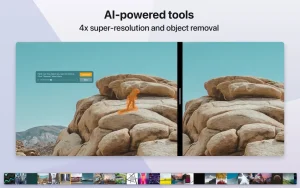
Geometry Reconstruction Fill Mode for Eraser The Eraser tool gets a major upgrade with a new strong geometry reconstruction fill mode an intelligent content-aware fill that analyzes surrounding geometry and textures to produce seamless, natural-looking results when removing objects or elements from images.
New Filters A fresh set of creative filters has been added to expand your editing palette giving photographers and designers even more ways to transform their images directly inside Pixea Plus without jumping to a separate editor.
macOS Tahoe Support Version 8.1 also builds on the macOS 26 Tahoe support and Liquid Glass design language introduced in v7, ensuring Pixea Plus looks and feels right at home on the latest Apple operating system.
What Made Pixea Plus Great Still Here
Blazing Fast with Every Format Pixea Plus handles virtually every image format beautifully:
- Standard formats: JPEG, HEIC, PNG, GIF, TIFF, BMP, WebP, Radiance
- Professional formats: Photoshop PSD, macOS & Windows icons, Fax images
- RAW formats: Canon CR2/CRW, Nikon NEF, Sony ARW, Fuji RAF, Leica DNG, Olympus ORF, Hasselblad 3FR, Minolta MRW
- Archives: View images inside ZIP files without extracting them
- Sketch files: Preview only
Built-in Batch Editor Process and export hundreds of images at once with the powerful Batch Editor introduced in version 8.0 resize, convert, flip, rotate, and apply adjustments in bulk.
Color Histogram & EXIF Data Instantly view a color histogram, full EXIF metadata, GPS info, and other file-related details right alongside your image.
Keyboard & Trackpad Native Full keyboard shortcut support and smooth trackpad gesture navigation make browsing your photo library feel completely natural and effortless.
Minimal & Distraction-Free UI The entire interface stays out of your way. No clutter, no toolbars you don’t need just your image, sharp and beautiful, edge to edge.
Compatibility
Pixea Plus 8.1.0 requires macOS 11.0 or later and supports both Apple Silicon and Intel Macs. Available on the Mac App Store in two editions free Pixea and the feature-rich Pixea Plus.

![zFuse Pro v1.7.58 [MAS] for Mac](https://appmacs.com/wp-content/uploads/2026/06/zFuse-Pro-v1.7.58-MAS-200x125.png)
About Author
