Notebooks 4.0.0 for Mac
Notebooks 4.0.0 for Mac
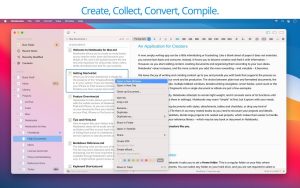
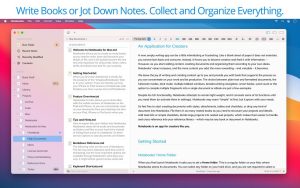
Notebooks are the only notebook you’ll ever need. They allow you to create a huge number of notes. They will become the one and only storage not only for all your journals, ideas, notes, drafts, stories, and diaries, but also for your projects, to-do lists, documents, files, and anything else you want to keep handy. Notebooks store and display virtually any type of document: plain text, PDFs, web pages, MS Office documents, photos, videos, music, and much more.
The app can share its files with mobile versions of Notebooks on iPad and iPhone, allowing you to conveniently work with documents beyond your desktop. Notebooks supports syncing across devices, Dropbox, and many WebDAV servers (Dropbox is currently the most convenient option).
Notebooks 4.0.0 for Mac The Only Notebook You’ll Ever Need
In a world full of note-taking apps that promise everything and deliver clutter, Notebooks takes a different approach elegance, depth, and rock-solid reliability. Developed by Alfons Schmid, Notebooks is a beautifully crafted writing and document management app for macOS, and version 4.0.0, released on April 3, 2026, is the most polished, stable, and refined build in its history.
What Makes Notebooks Special?
Notebooks is not just a note-taking app it’s your personal repository for everything. Write, store, and organize journals, ideas, drafts, task lists, projects, documents, photos, PDFs, web pages, and more all in one thoughtfully designed place. As the developer puts it: “Notebooks is the only notebook you ever need.”
What’s New in v4.0.0?
This update focuses on refinements, reliability, and visual consistency across the app. Several improvements enhance everyday editing, task extraction works more consistently, and typing performance has been significantly improved.
Page Numbers & Go to Page Notebooks now displays the current page number in the document’s footer. A new “Go to Page…” option (opt-cmd-G) lets you jump to any page instantly — a long-requested feature for anyone working with longer documents.
Smarter Task Handling Clicking a task icon now displays a menu with options instead of toggling immediately making task handling more predictable and reducing accidental changes to your to-do lists.
Reliable Task Extraction Automatically extracted tasks are now reliably stored in the default inbox keeping your workflow consistent and organized without any surprises.
Crash Fix for Fast Typists A bug that could cause a crash when typing very fast in plain text has been resolved great news for writers who live on the keyboard.
Better Image & File Handling Importing images with drag and drop is now more robust, with improved detection of HEIC and GIF files. Links to embedded images stored outside Notebooks’ hierarchy now work as expected.
JXL Image Format Support Notebooks now supports the modern JPEG XL (JXL) image format keeping the app ahead of evolving file standards.
Smarter Text Recognition Text recognition now uses automatic language detection on macOS 13 and later, improving OCR accuracy across different languages.
Core Features That Make It Shine
- Stores Everything plain text, formatted text, PDF, web pages, MS Office, iWork documents, photos, videos, music, and more
- Task Lists built-in to-do management with task extraction from your notes
- Markdown Support write in Markdown with live preview
- Full-Text Search find anything across your entire library instantly
- iCloud Sync works seamlessly across Mac and iOS devices
- Distraction-Free Writing a clean, focused writing environment that stays out of your way
Pricing & Compatibility
- Price: $43.99 one-time purchase (no subscription)
- Requires macOS 10.15 Catalina or later
- Supports both Apple Silicon and Intel Macs Universal Binary
- Available from the Mac App Store and the developer’s website



About Author
