MindNode 2026.3 for Mac
MindNode 2026.3 for Mac
All great ideas begin with a fleeting thought. Then another. And another. And a million more. MindNode helps you capture and organize these thoughts, transforming fragments into a clear picture.
IT ALL STARTS WITH AN IDEA
• Write down ideas
Words, images, links, tasks, notes any form will do to capture a thought. Don’t get distracted by layout! MindNode helps you express the ideas in your head and present them to the world. The “Quick Entry” feature lets you instantly capture your thoughts.
• Organize your thoughts
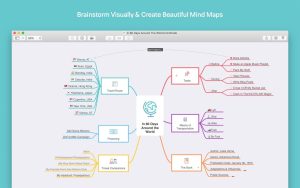
As you delve deeper into a problem or topic, you begin to see new connections. Add or adjust your ideas at the speed of thought. Endlessly transfer ideas, create and break connections. Focus mode and collapsible branches provide the necessary level of concentration on a single thought.
• Create your own mind maps
Personalize your mind map with unique template themes or create your own design style. With MindNode, it will look exactly how you imagine it down to the last detail! And the Smart Layout feature will help you create the perfect document.
• Share your vision of the world
Easily share your documents with others or take them to the next step in the creative process. Create tasks for Apple Reminders, Things, or OmniFocus. Export projects as text, images, or documents in RTF, Docx, CSV, OPML, PDF, Markdown, or TaskPaper formats.
PRODUCTIVITY WHEREVER YOU ARE
Take notes on the go or from the office using your iPhone, iPad, or Mac, or even during a workout with your Apple Watch. Created documents can be saved to iCloud Drive and accessed on any device.
MAIN FEATURES
• Save everything: text, images and links
• Tasks: Turn your notes into tasks with a progress bar
• Notes: Make a clear mind map and don’t forget even the smallest detail
• Cross-joins: connect records from different branches
• Clear structure: display the entire mind map on one page and use search
• Quick entry: Just start typing to save your thoughts
• Template themes and unlimited personalization
• Stickers: 260+ handmade stickers with customizable colors
• Design: a variety of settings for the smallest details of your document
• Vertical and horizontal layouts
• Collapsible branches: Collapse what is currently in the way
• Focus mode: concentrate on a specific branch
• Dark Theme: Record your nighttime thoughts
• External screen support
• Import tasks into Reminders, Things and OmniFocus
• Export: text, images or rtf, docx, csv, opml, pdf, markdown, TaskPaper formats.
• Sync with iCloud Drive
MindNode 2026.3 Mind Mapping and Outlining for Mac
MindNode is one of the best mind mapping apps available on any Apple platform, and version 2026.3, released in May 2026 by IdeasOnCanvas, is a focused and practical update that improves library organization, cross-device history, and the writing workflow for Mac users who use MindNode as part of a broader creative process.
What is MindNode?
MindNode is a native mind mapping and outlining app for Mac, iPhone, iPad, Apple Watch, and Vision Pro. You build mind maps on an infinite canvas by connecting nodes, adding notes, tasks, images, stickers, and visual tags, then switch to Outline view whenever you need a linear, structured view of the same content. It syncs across all your Apple devices via encrypted iCloud, and the on-device Apple Intelligence integration supports brainstorming assistance and document summarization without sending data to a server. Export options include PDF, OPML, Markdown, and more, and it imports from FreeMind, Xmind, and other formats.
What’s New in 2026.3
The headline addition is nested folders in the document library. You can now group maps inside folders however makes sense for your workflow by client, year, project type, or any other hierarchy making large collections of mind maps significantly easier to navigate. Desktop widgets have also been added, letting you open your most-used maps in one click directly from the desktop.
Document History, which first arrived on Mac in version 2026.2, now comes to iPhone, iPad, and Vision Pro as well. You can browse earlier versions of any map, see how your thinking evolved over time, and restore previous content whenever you need it a genuinely useful safety net for long brainstorming sessions. Outline view has also been extended to Vision Pro in this release, so you can switch between mind map and structured list view in your spatial workspace.
The Marked app integration is another standout addition for Mac users. MindNode now connects directly with the Marked app, letting you preview your mind map content as beautifully rendered formatted text without leaving your workflow a useful bridge for writers who brainstorm in MindNode and draft in a text editor.
The Free Editor also gains more in this release additional styling and layout controls, a starter set of 12 stickers, and an Important tag are now available without a subscription. A patch, 2026.3.1 released on May 29, 2026, improved Setapp support for the Marked integration.
Pricing
MindNode is free to download with a generous core feature set. MindNode Plus unlocks outlining, notes, themes, stickers, and advanced styling at around $2.99 per month or $24.99 per year. It is also available through Setapp and requires macOS 15.0 or later.




About Author
