BatFi v3.0.5 for Mac
BatFi v3.0.5 for Mac
BatFi helps optimize your macOS battery performance by intelligently managing charging levels while giving you complete control—charging to 100% only when needed.
BatFi is a lightweight and simple app that simplifies battery management.
With BatFi, you set a charging limit once and then forget about it. The app prevents overcharging, helping extend your battery’s lifespan. And when you need a full charge, a single menu command lets you manually charge it to 100%.
Maintaining a lithium-ion battery in a high-charge state can significantly reduce its lifespan. While macOS offers a feature that automatically delays charging until the battery reaches 100%, it lacks user control. This automated approach relies on machine learning to adapt to user habits, leaving users unable to determine when and for how long to delay charging. Consequently, this solution may be ineffective for users who use their computer infrequently or for devices that are frequently connected to power sources, such as monitors like Apple’s Studio Display or Pro Display XDR.
BatFi, on the other hand, works differently. The app allows you to set a user-selected battery charge limit and maintain it indefinitely. With BatFi, you have the flexibility to decide when to charge your battery to 100%, depending on your usage needs.
Features: BatFi’s
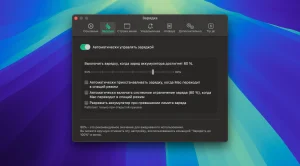
automatic charging suppression
starts with your system and actively monitors your battery’s charge percentage. Once the battery’s charge reaches a threshold (either set by you or the default 80%), the app automatically blocks further charging while your computer is connected to an AC adapter. By avoiding full charging, BatFi helps extend battery life over the long term.
Convenient 100% Charging Option
: Need maximum battery life for a specific task? BatFi offers a dedicated menu command, accessible via the status bar icon. With one click, you can charge your battery to 100% for those times when you need extra power.
Information Notifications:
Stay informed about charging status changes with BatFi notifications. Receive alerts about charging status changes and gain instant access to battery information by tapping the status icon. View important information such as battery percentage, estimated time remaining, battery cycle count, battery temperature, power source status, and overall battery health.
Customizable Status Icon:
The BatFi status icon is both functional and visually appealing. Customize the icon to your liking and enjoy a battery symbol with an elegantly displayed percentage and charging status. Witness a super-cool animation when the status changes, adding a touch of excitement to your battery monitoring experience.
Set it and forget it
BatFi takes care of battery management with ease. Once you’ve configured your preferred settings, the app will run in the background without requiring any further intervention. Just configure it and let BatFi take care of the rest.
You can find more detailed information and errors here.
BatFi v3.0.5 for Mac The Battery App Apple Should Have Built
Your MacBook’s battery is one of its most valuable components and how you charge it makes all the difference to how long it lasts. BatFi by Micropixels is the elegant, intelligent battery management utility that gives you complete control over your Mac’s charging the way Apple’s built-in feature never could. Version 3.0.5 is the latest build, and it runs beautifully on every Apple Silicon Mac.
The Problem BatFi Solves
Apple’s built-in Optimized Battery Charging is clever but it relies entirely on machine learning to predict your schedule. If you have irregular usage patterns, work from home all day, or keep your Mac plugged into a monitor like the Studio Display or Pro Display XDR, the built-in feature simply doesn’t work reliably. Your battery sits at 100% for hours silently degrading.
BatFi fixes this completely. It lets you set a user-chosen charging limit and maintain it indefinitely giving you full flexibility to decide when to charge to 100% based on your actual needs.
Key Features
Custom Charging Limit Set your own charging threshold defaulting to a battery-friendly 80% and BatFi maintains it automatically. Once plugged in, your battery charges to your limit and stops protecting battery health every single day without any manual effort.
One-Click 100% Charge Heading out for a long day and need full power? BatFi provides a dedicated command right in the menu bar one click charges your battery to 100% whenever you need it.
Automatic Charging Inhibition BatFi launches with your system and actively monitors your battery. Once the charging state reaches your threshold, it automatically inhibits further charging when connected to power no manual intervention required.
Informative Status Bar Icon The customizable menu bar icon shows your battery percentage, estimated time remaining, cycle count, temperature, power source status, and overall battery health everything at a glance, right from the status bar.
Smart Notifications Stay informed with intelligent alerts when your charging mode transitions so you always know what’s happening with your battery, without having to check.
Set It and Forget It Configure your preferred settings once, and BatFi works seamlessly in the background, requiring no further intervention. Your battery is protected silently, every day.
Discharge Mode For advanced users, BatFi also supports controlled discharging including an option to disable sleep during discharge in clamshell mode, allowing you to drain your battery to a lower level when needed for calibration or maintenance.
Pricing & Compatibility
- Price: $15.00 from micropixels.software
- Requires macOS 14 or later Apple Silicon (ARM 64-bit) Macs only
- Also installable via Homebrew
brew install --cask batfi - 7 MB lightweight and efficient



About Author
