Live Home 3D Pro 4.12.1 for Mac
Live Home 3D Pro 4.12.1 for Mac
Live Home 3D Pro is an intuitive app for interior design of apartments and houses, as well as landscapes of virtually any complexity. The Pro version offers an expanded set of tools and exceptional export quality.
General
• Detailed drawings of premises.
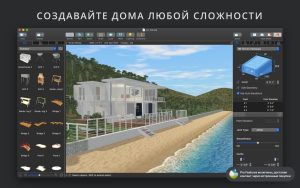
• Real-time 3D rendering.
• Unlimited number of floors.
• Collection of built-in video tutorials.
• Fast technical support service built into the Assistant program.
• Gallery of house and room projects.
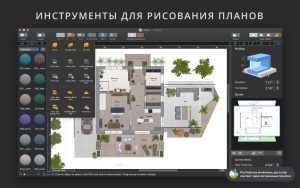
Drawing instruments
• Add a room in one move using the Room tool.
• Tools for creating straight and curved walls.
• Ground Surface, Height Contour, Height Isospline, Pit and Path tools to reproduce an identical copy of the landscape around your home.
• Vertical view mode.
• Automatic contour display for furniture and fittings in the drawing.
• Automatic dimension lines for walls, floors and ceilings during drawing.
• Support for various units of measurement (inches, feet, meters, etc.).
• Smart dimension lines for setting distances between objects and walls.
• Precise positioning thanks to guides and adhesion mechanism.
Real-time 3D environment
• Control lighting, add and move objects, assign materials – all this directly in 3D.
• All changes in 2D and 3D are rendered in real time.
• Virtual walks in 3D interiors.
• Setting the FOV (field of view) and projection type of the camera.
• Possibility of installing multiple cameras to display the interior from different points of view.
• Natural lighting thanks to adjustments to geo-positioning, time of day and cloud cover.
• Customizable light sources to create a realistic lighting scene.
• Light source editor for adding lamps to imported objects.
• Corner windows and complex openings.
• Adjust level of detail on the fly to simplify 3D models and speed up rendering.
• Professional Shadow Map technique for creating soft and natural shadows.
3D models and materials
• 2000+ furniture and other models.
• Import models directly from Trimble 3D Warehouse™ (formerly Google 3D Warehouse™).
• 2100+ surface materials.
• Transfer an image from Finder and apply it as a surface material.
• Advanced Material Editor (helps you create more complex materials with reflective, glossy and rough surfaces).
• The ability to set the exact tile size in the material settings allows you to calculate how much material will be needed to renovate your home.
• Import objects in the following formats: SketchUp, COLLADA, KMZ, FBX, OBJ and 3DS.
• Polygonal “building block” tool for creating balconies, terraces, etc.
Roofs and attics
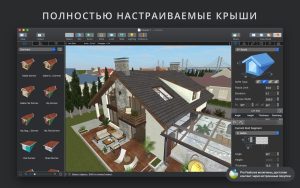
• Roof creation assistant with 12 customizable templates.
• Additional control of roof shape.
• Add segments to fully customize your roof.
• 16 customizable loft types.
Export and publish results
• Export 3D images to JPEG, TIFF, PNG, and BMP (up to 16000 x 16000).
• Rendering of realistic video of a virtual walk (in Ultra HD resolution).
• Instantly send a copy of the project via Mail, Messages or AirDrop.
• Export to 3D formats: COLLADA, Trimble SketchUp™, VRML V2.0, X3D, FBX and OBJ.
• iCloud support.
Live Home 3D Pro 4.12.1: A Practical Update for Mac Home Design Software
Live Home 3D Pro, developed by BeLight Software, is a home, interior, and landscape design application for Mac that combines 2D floor planning with real-time 3D visualization. It’s built to serve both homeowners planning renovations and professional designers who need detailed, presentation-ready outputs, all without switching between separate CAD and rendering tools.
Core Workflow
Design starts in 2D: users draw walls, set room dimensions, and add doors and windows using intuitive point-and-click tools, either from scratch or by tracing an imported floor plan image. Switching to 3D view automatically builds out the structure, where furniture, materials, and lighting can be placed and adjusted in real time. The built-in library includes thousands of 3D objects and materials, and users can pull in additional models from the Trimble 3D Warehouse or import COLLADA, FBX, OBJ, and 3DS files directly.
What’s New in 4.12.1
This release is a focused update rather than a major feature drop:
- Added Polish localization for the application interface.
- Expanded Help documentation translations to include Japanese, Portuguese, Russian, Ukrainian, Polish, and Chinese.
- Improved Collada (.dae) model import for more reliable use of third-party 3D assets.
- Fixed issues affecting certain roofing materials.
- General bug fixes and stability improvements.
Pro Edition Highlights
Beyond the shared core toolset, the Pro edition unlocks tools aimed at more serious layouts: custom terrain editing for gardens and driveways, a dedicated material editor, 2D elevation views for wall openings, freely shaped roofs via a Roof Assistant with 12 templates and 16 dormers, a polygonal building-block tool for structures like balconies and porches, extended camera controls, and export support for USDZ, glTF, FBX, OBJ, and other formats suited to AR and presentation workflows.
Rendering and Platform Support
Ray-traced stills and videos can be produced using either AMD Radeon ProRender or the Cycles engine, both running locally on-device at no extra cost, with geolocation-based sun positioning for realistic lighting. Projects sync across Mac, iOS, iPadOS, and visionOS. The app requires macOS 11.0 or later and runs natively on both Intel and Apple Silicon Macs.



About Author
