Final Cut Pro 12.3 for Mac
Final Cut Pro 12.3 for Mac
Final Cut Pro combines advanced video editing and media organization with incredible performance that empowers you to create at the speed of thought.
Advanced video editing technologies
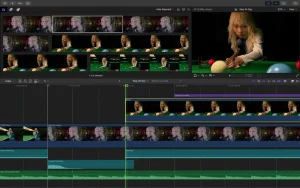
• Magnetic Timeline uses advanced metadata and Clip Connections technology for fast and easy editing.
• Improved indexing allows you to move audio clips around the timeline by simply dragging and dropping.
• Object Tracker technology automatically matches titles and effects to the movement of faces or objects in the video.
• You can change focus points and depth of field in videos shot on iPhone using Cinema Effect mode (requires macOS Monterey or later).
• Edit video from multiple cameras and enjoy automatic sync with support for up to 64 shooting angles.
• Automatically convert video projects to square or vertical format with Smart Conform.
• Import and edit equirectangular panoramic videos in various formats and aspect ratios.
• Create, edit, and save closed captions right in Final Cut Pro.
• Use third-party extensions to get even more features.
Organize your media files efficiently
• Organize files into media libraries for efficient content management and collaboration.
• Create proxy copies of media files for increased portability and efficiency.
• Apply your own keywords to ranges of clips and instantly add them to your favorites.
• Dynamically organize content into smart collections to find any shot in seconds.
• Identify duplicates by color-coding clip ranges or indexing on the timeline.
Incredible performance
• Mac computers with Apple chips are now even faster and more efficient.
• Optimized for M2 Pro, M2 Max and M2 Ultra chips and delivers unrivaled performance.
• Work with a wide range of formats, including ProRes, RED, XAVC, AVCHD, Avid DNxHR, Avid DNxHD, H.264, HEVC and many more.
Impressive customizable effects
• Add easily customizable 2D and 3D titles with beautiful animations.
• Change title styles, transitions, and effects with intuitive controls.
• Choose third-party FxPlug plugins with their own interfaces.
Built-in audio editing features
• Assign audio roles upon import to easily track and manage project elements.
• Open and edit multi-channel audio files on the timeline.
• Apply Logic-based effects and remove background noise to make voices sound clearer.
• Synchronize video with individual audio files using instant waveform matching.
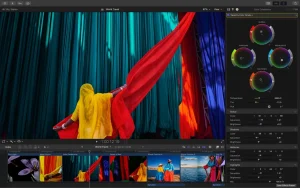
Intuitive color correction
• Import, edit, and save video in standard color spaces or in Rec. 2020 and HLG spaces.
• Fine-tune modulation and masks with visual color wheels and curves.
• View HDR video with accurate color on MacBook Pro and Pro Display XDR.
Convenient optimized export
• Instantly export projects in a format suitable for playback on Apple devices and uploading to Vimeo, YouTube and other hosting services.
• Export groups of audio sources and different versions of processed video using role metadata.
• Import and export XML files for third-party workflows such as color correction and audio mixing.
System requirements: macOS 13.5 or later; 8 GB of RAM (16 GB recommended for third-party effects and plug-ins); a graphics card with Metal support (only for Mac computers with an Intel processor); 5.8 GB of available disk space.
Some features require a Mac computer with an Apple chip. Some features require an internet connection; fees may apply. Blu-ray disc burning requires a Blu-ray recorder.
Final Cut Pro 12.3 for Mac What’s New
Apple has released Final Cut Pro 12.3, a major update packed with AI-powered editing tools and long-requested workflow improvements. It arrives as part of the broader Apple Creator Studio update, which also refreshed Motion, Compressor, and other creative apps.
Key New Features
1. Generate Captions Using on-device AI, Final Cut Pro can now automatically transcribe audio and place subtitles directly on the timeline, with customizable fonts, colors, positions, and animation styles. This feature requires a Mac with Apple silicon and is currently available in U.S. English only.
2. Auto Mask Auto Mask uses on-device AI to instantly isolate recognized elements—such as people, hair, sky, foliage, and clothing—for color correction or enhancement, removing the need for manual tracking. It works alongside the existing Magnetic Mask tool.
3. Match Color An AI-powered Match Color tool intelligently adjusts color sliders to blend footage from different cameras, lighting conditions, and cinematic styles, using a reference frame chosen by the editor. This tool has been rebuilt following Apple’s recent acquisition of Color.io.
4. Edit Detection This feature analyzes any previously rendered video and automatically splits it back into its original clips based on detected edit points useful for revisiting an edit or assembling a highlight reel without manually hunting for cut points.
5. Workflow Improvements Editors get a persistent two-up display while trimming with keyboard shortcuts or the Precision Editor, advanced frame-by-frame trimming controls, and the option to convert closed captions into subtitles. Proxy media now uses HEVC instead of H.264 for better compression and HDR support, and background rendering is now off by default.
6. New Creator Themes Final Cut Pro adds new Creator Themes with support for multiple aspect ratios, dynamic titles, and customizable backgrounds, available with an Apple Creator Studio subscription.
System Requirements
Final Cut Pro 12.3 requires macOS 15.6 or later.
Why It Matters
This update brings Final Cut Pro closer to matching AI-driven features found in competitors like DaVinci Resolve and Premiere Pro, while keeping its signature clean, fast editing workflow. Features like Auto Mask and Match Color are especially useful for solo creators and colorists looking to speed up repetitive tasks.



About Author
