DirEqual 7.6.2 for Mac
DirEqual 7.6.2 for Mac
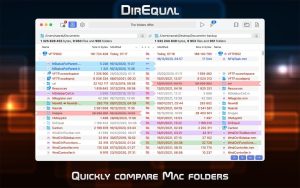
DirEqual is a folder comparison tool that makes it easy to compare local files and folders on your Mac. DirEqual displays compared directories side by side in expandable tree views, with the size and date displayed for each item. Differences between directories are color-coded and easily identified with icons.
To copy or delete files or folders, click on an individual item and select the appropriate action. The action is indicated by a red or blue arrow. Then click “Run” to sync the two folders.
Key Features:
Comparing folders side by side
Compare files by content
Synchronizing compared folders manually
Compare items based on a file name pattern
Remembers compared folders for quick reboot
Intuitive graphical display of comparison results
Tabbed window
Drag and drop support
DirEqual 7.6.2 Folder Comparison Tool for Mac
DirEqual is one of the cleanest and most capable folder comparison utilities available on Mac, and version 7.6.2, released on May 28–30, 2026, is the latest build from Naarak Studio with a focused set of improvements to the merge module and copy operations.
What is DirEqual?
DirEqual is an advanced directory comparison tool built exclusively for macOS. It displays two folders side by side as expandable trees, with differences highlighted using colors and icons that indicate whether items differ in size, date, or content. For text files, it goes a step further — comparing files line by line and highlighting differences at the word and character level, with a minimap in the middle that gives you a visual overview of all changes at a glance. You can also create snapshots of any folder to track how it changes over time or compare it against a different directory later.
When you spot a difference, acting on it is simple. Click an item and choose to copy or delete it the action shows as a red or blue arrow then hit Execute to sync the two folders. It supports local folders as well as network and external drives.
What’s New in 7.6.2
This update improves and refines the merge module, adds support for skipping identical items inside subfolders during copy operations, and ensures that tags and modification dates are now updated from the source item even when identical items are skipped. General bug fixes and performance improvements are also included.
Earlier 7.6 builds added file preview icons that display thumbnails for images, PDFs, documents, and movies, and improved macOS 26 Tahoe support so custom folder icons now display exactly as they appear in Finder. The 7.5 and 7.4 series earlier in 2026 brought completely redesigned Include and Exclude rules for files and folders, supporting begins with, ends with, contains, wildcard, regular expression, and full path matching.
Pricing
DirEqual is priced at $39 as a one-time purchase and is also available as a monthly or yearly subscription. It requires macOS 10.13 or later and runs natively on both Intel and Apple Silicon Macs. A trial is available before purchase.

About Author
