BusyCal 2026.2.3 for Mac
BusyCal 2026.2.3 for Mac
When your day is planned down to the minute, you need a calendar that won’t be a burden. Try BusyCal—an elegant and easy-to-use calendar designed to make your life easier. Packed with useful features like travel time tracking, built-in to-do lists, and quickly added events, this app is sure to save you time and hassle. Plus, its instant syncing makes it easy to switch between devices or manage multiple work and personal calendars.
Flexible Interface
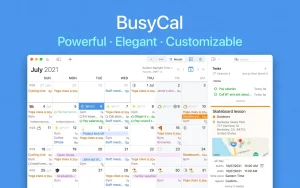
Easily switch between day, week, and month views with a clean, clear upcoming events panel. Customize the design even further. You can not only choose the font style and size, color-code events, but also customize the number of weeks in a month and the days in a week. The interface is designed to suit your needs.
Convenient Tasks
Plan your tasks and watch how the calendar seamlessly integrates them into your daily life. BusyCal keeps your tasks top of mind and on top of your week, making it ideal for long-term planning. Your task list automatically syncs with other reminder apps, so you’ll never forget what to do next. The app even features a dedicated to-do list that you can access with a single click.
Quick Editing:
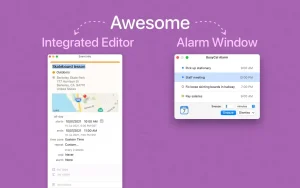
Easily add and edit events using the BusyCal dashboard. It occupies the app’s sidebar and, among other things, allows you to update entries, times, tags, and locations. The dashboard is easily customizable, allowing you to tailor important information to your specific needs.
Commute Time
Calculation: Never be late again thanks to BusyCal’s most useful feature—its built-in commute timer. Planning your events is only half the battle, as you also need to factor in transportation issues or transfers. The app integrates with Maps and Location Services on your Mac, providing precise information about how long your commute will take and allowing you to fit it into your schedule.
Natural Language:
Multitask by quickly creating events during discussions. Enter a location, attendees, or time, and natural language processing will interpret and schedule your entry accordingly. This allows your schedule to understand words like “tomorrow” and respond with specific dates, saving you time on manual scheduling.
Customizable Notifications
Create custom reminders that work for you, from pop-up notifications to audio alerts. Alerts can be turned off, paused, and repeated as needed; they work even when the BusyCal app window is closed. This is a great way to ensure you don’t miss anything, and careful planning will pay off.
BusyCal 2026.2.3 for Mac Quick Overview
BusyCal is a powerful, flexible, heavily customizable, and reliable calendar app for macOS, built as a richer alternative to Apple’s stock Calendar app.
What’s New in 2026.2.3
This version adds automatic cross-calendar time blocking with synced rules across Mac and iPhone, plus scripting hooks and alarm-window improvements.
Core Features
- Quick Editing Dashboard: Sits in the app’s sidebar for easily adding and editing events update entries, times, tags, and locations on the fly. The dashboard is customizable, so you can tailor it to surface the information you care about most.
- Customizable Day, Week, Month, Year, and List views, with control over weeks per month, days per week, fonts, colors, and time format
- Connects to iCloud, Google, Microsoft 365, Exchange, CalDAV, Reminders, Todoist, and more letting one app host calendars from several services
- Travel-time planning, weather, tags, sticky notes, and conference-call detection for real-world scheduling
- Natural language support for creating recurring events from phrases like “every day,” “every month,” or “every year”
- A dedicated alarm window with snooze controls that work even when the main app isn’t running
Requirements & Pricing
Requires macOS 11.5 or later. A free edition covers basic calendaring, with premium features available via a 14-day trial before subscribing.



About Author
