Almighty 2.10.5 for Mac
Almighty 2.10.5 for Mac
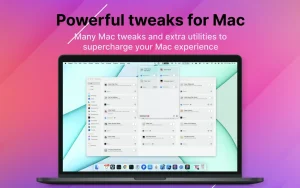
Almighty is a convenient and easy-to-use app that provides powerful configuration options for your Mac. It simplifies tedious settings and lets you manage various aspects of the system, including the Dock, Finder, Desktop, and Xcode.
Some features of the application:
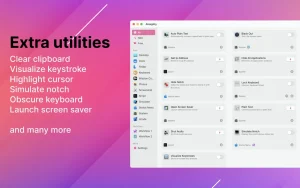
– keyboard lock – clear clipboard – visualize keystrokes and cursor – hide all applications (minimize all application windows) – convert copied text to plain text – dim screen – focus active windows – expand shortened URLs and more
In Almighty, you can create your own scenarios and organize settings into a workflow to perform all actions simultaneously. Each task can be configured with a keyboard shortcut for even faster execution.
Almighty 2.10.5 for Mac 50+ Power Tweaks in One Menu Bar App
Most Mac users don’t realize how many hidden settings and powerful features are buried inside macOS. Almighty brings all of them to the surface no Terminal commands needed.
Almighty is a convenient and easy to use macOS menu bar application that exposes powerful configurations for your Mac, simplifying tedious settings and allowing fantastic controls that would otherwise require verbose AppleScripts or command line knowledge with all powerful settings and utilities just one click or toggle away.
What It Can Do
Almighty covers tweaks across System, Dock, Finder, Desktop, and Xcode. Some standout features include locking the keyboard, clearing the clipboard, visualizing keystrokes and cursor, hiding all applications, converting copied text to plain text, blacking out the screen, and much more.
It also offers unique features like emoji aliases, preview Dock windows, and the ability to create fully custom tweaks using command-line scripting and AppleScript.
What’s New in Version 2.10.5
Recent updates include an updated tweak list layout on the menu bar, the ability to reorder tweaks in the menu bar, a new Increase Brightness tweak that extends Mac brightness beyond the standard range, along with other improvements and bug fixes.
Why It’s Worth It
Users report that Almighty replaced at least 10 other utility apps they had installed putting everything in one place with a consistent interface.
You can set up your must-have selection of favourite tweaks in the menu bar dropdown and access them any time, organizing and running them in just a few clicks.
Compatibility: macOS 12.0 or later
If you want to unlock the full potential of your Mac without ever touching the Terminal, Almighty 2.10.5 is one of the smartest and most satisfying utilities you can install.



About Author
