Camo Studio 2.7.2 for Mac
Camo Studio 2.7.2 for Mac
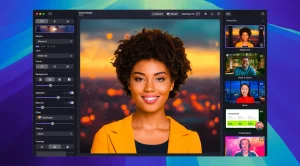
Camo Studio is a powerful app that turns your smartphone (iPhone or Android) or tablet into a high-quality webcam. This solution is ideal for streamers, remote workers, teachers, and anyone who wants to improve the video quality of their calls, broadcasts, and recordings without purchasing expensive equipment. Camo Studio is a finalist for the 2023 Apple Design Award.
Peculiarities:
Outstanding Video Quality • Use your smartphone’s advanced optics to capture video in up to 4K UHD resolution with high image quality, even in low light conditions. The app supports a wide range of frame rates, including 60 FPS, for smooth video.
Full control over your image Camo Studio provides professional tools for real-time video adjustments:
• Manual adjustment of focus, exposure, white balance and zoom
• Color correction using LUT files and 18 built-in filters
• Digital image stabilization to eliminate vibrations
• Portrait mode for creating a bokeh effect and Video Call mode for improving lighting.
Creative tools
• Virtual Green Screen (Replace): Replace the background without special equipment
• Auto Framing: The system tracks you, keeping you in the center of the frame even when you move
• Overlays and Scenes: Create professional scenes with multiple layers, text, logos and web overlays, and switch between them with one click.
• AI Face Retouching: Smooth skin tone and balance facial features for a more polished look.
High performance • All video processing is performed on your phone, freeing up your computer’s CPU and GPU resources for other tasks critical for streamers. On systems with AMD Ryzen AI, effects processing can be performed on the NPU (neural processing unit), increasing efficiency.
Camo Studio 2.7.2 Professional Video for Mac, Meetings, and Streams
Camo Studio is one of the most capable video production tools available on Mac for meetings, recordings, and live streaming, and version 2.7.2, released on May 20–21, 2026, is a focused maintenance update that follows the significant 2.7 and 2.7.1 feature releases from earlier that month.
What is Camo Studio?
Camo Studio, developed by Reincubate, turns your iPhone, iPad, Android device, webcam, or DSLR into a polished virtual camera that any video app can use Zoom, Google Meet, Microsoft Teams, FaceTime, Discord, OBS, and dozens more. You manage everything from Camo Studio on your Mac: framing, lighting, backgrounds, filters, overlays, and scenes. The result routes through a virtual camera output that looks far better than a built-in Mac webcam in any app that picks it up.
What the 2.7 Series Brought
Version 2.7, released in early May 2026, was a major release. It introduced native streaming to Twitch, YouTube, and Kick directly from Camo Studio without needing OBS or a third-party tool. Stream Panels bring in-app chat so you can monitor your audience without switching windows. Multi-camera support moved out of add-ons and became a fully integrated part of the Camo workflow, and Video File layers were added so you can mix recorded footage alongside live camera sources. The Windows and macOS experiences were also significantly aligned, with Windows users gaining the new unified gallery and Flyout control.
Version 2.7.1 extended native streaming further with deeper YouTube Live integration and additional reliability improvements across both platforms.
What’s New in 2.7.2
Build 2.7.2, released May 20, 2026, is a targeted maintenance release for Mac. It improves reliability for long YouTube live streams, fixes a crash that occurred when an active Camo Camera device disconnected while the source dropdown was open, and corrects a sidebar layout issue when switching between video and camera layers.
Pricing
Camo Studio has a free tier that covers core features. Camo Pro unlocks advanced effects, native streaming, and recording options, priced at $49.99 per year or $99.99 as a lifetime purchase. It requires macOS 12.3 or later and is optimized for Apple Silicon.



About Author
