DaisyDisk 4.34 for Mac
DaisyDisk 4.34 for Mac
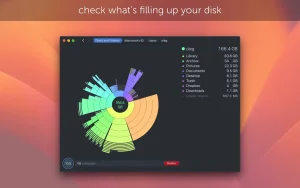
Get a visual breakdown of your disk space usage on an interactive map, identify the largest unnecessary files, and delete them with a simple drag-and-drop. Find out what’s hiding in the “Other” category of your storage and clean it up. Free up disk space by identifying and deleting large, unnecessary files.
Mac App Store Editor’s Choice for “Essentials,” “Best of Mac App Store” in 2015, 2013, and 2011, “Get Productive,” “Get Stuff Done,” and “Invaluable Utilities”
Over 500 press reviews, including top publications like Forbes, TechRadar, Lifehacker, Gizmodo, MacRumors, 9to5mac, Macworld, TUAW, MacStories and many more.
Distinctive features:
• Unique interface that makes it easy to find and delete large, useless files
• Unmatched scanning speed – typically takes only a few seconds to scan your entire system drive (depending on your drive model and processor)
• Integration with QuickLook for quick viewing of file contents
• Parallel scanning of multiple disks at maximum speed
• Real-time information about mounted disks
• Deleting files from the application
• Full support for Retina screens
DaisyDisk 4.34 for Mac
DaisyDisk is one of the most popular disk space analyzers for Mac, letting you visualize exactly what’s eating up your storage and clean it up in just a few clicks. Instead of digging through folders manually, it scans your disk and shows the results as an interactive, color-coded sector diagram.
How It Works
The app scans your disk and displays its content as a sector diagram where the biggest files and folders become instantly obvious. Click into a segment to drill down into a folder, or click the center to go back up. Hovering shows the name and path of each file. Once you spot something you don’t need, just drag it into the built-in “Collector,” review what’s inside, and delete everything with a single click.
Key Features
- Fast Scanning – scans a full disk in seconds rather than minutes
- Instant File Preview hit the Space bar to preview file content without opening another app
- Snapshot & Hidden Space Discovery finds and helps purge macOS snapshots that quietly consume space and are otherwise hard to detect
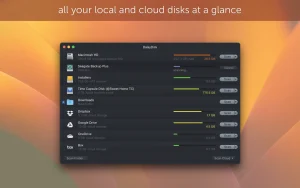
- Cloud Storage Scanning connect and remotely scan Dropbox, Google Drive, Microsoft OneDrive, and Box
- Safe by Design system files are automatically safeguarded, so only you decide what gets deleted
- Privacy-Friendly DaisyDisk doesn’t collect or transmit data and doesn’t track you
What’s New in 4.34
Recent DaisyDisk updates have focused on adding dark and liquid glass icons to match macOS Tahoe’s new style, improving Tahoe support, and increasing the accuracy of hidden space estimation, along with a fix for incorrect size estimates on FAT32 and exFAT drives, plus general bug fixes.
Compatibility & Pricing
Supports macOS 10.13 or later, runs natively on Apple Silicon (including newer M-series chips), and is sold as a one-time lifetime purchase that includes updates and bug fixes not a subscription.



About Author
