Timing 2026.3.1 for Mac
Timing 2026.3.1 for Mac
Timing is a professional tool for automated time tracking and productivity improvement. It tracks app, document, and website usage without manual timers, helps you create accurate timesheets, and analyze work patterns with support for AI dashboards, calendar integration, and report export.
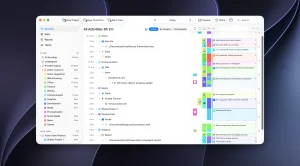
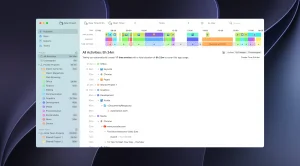
Timing works in the background, automatically recording which apps, documents, and websites you work in. At the end of the day, you view the timeline, drag and drop activities into projects, and get ready-made reports—without having to start and stop timers manually.
Features: • Full automation Timing tracks all the applications, documents, and websites you use on your Mac. It even automatically records the time in different browser tabs (Safari, Chrome, Firefox). No manual starts or stops.
• Automatic grouping and AI-powered summary: AI groups related tasks and highlights key patterns. Instead of a crude activity log, you get a clear picture of your day: what you worked on and how long it took.
• Smart Rules (⌥-drag): Simply drag an activity into a project while holding down the Option key, and Timing will remember the rule. Next time, similar tasks will automatically be placed in the correct project. This saves hours of manual categorization.
• Track your work beyond your computer Timing tracks time spent on phone calls, meetings, calendar events, and reminders. Nothing gets lost.
• Cross-platform via Screen Time Imports mobile app usage from Screen Time giving you a complete picture of your work across all devices.
• Detailed reports and timesheets. Export to PDF, XLSX, CSV, and HTML. Suitable for freelancers, lawyers (for calculating billing hours), and teams. Can be integrated with the GrandTotal invoicing application.
• Teamwork without micromanagement: Administrators see only aggregated time by project, without personal details. Team members report through a web application.
• Web app and API Access timers from your phone, cloud synchronization (optional), Web API and integration with Zapier.
• Privacy All data is stored locally by default. Private/incognito tabs are not tracked. You can add activities to the exclusion list.
Timing 2026.3.1 Automatic Time Tracking for Mac
If you want to know exactly where your time goes on a Mac without manually starting and stopping timers, Timing is the app for you. Version 2026.3.1, released on April 24, 2026, brings a set of thoughtful interface improvements and a genuinely useful new billing feature.
What is Timing?
Timing automatically tracks your time by logging every app, website, and document you work on throughout the day. There is nothing to start or stop it runs quietly in the background, and you review and organize your activity afterward. All tracked data is stored locally and stays private on your Mac, with built-in options to exclude incognito tabs or specific private applications. Apple App StoreFilehorse
What’s New in 2026.3.1
The headline addition is time rounding for reports. Timing can now round time entry durations in reports for cleaner timesheets, which is especially useful when billing clients in fixed increments such as rounding to the nearest 15 minutes or 6 minutes for easier invoicing. You can round up, round down, or round to the nearest interval all from the reports view. Macupdate
On the interface side, you can now completely hide the project drop zone via the View menu, and the New Project toolbar button now doubles as a secondary drop target dropping activities, files, or folders onto it creates a matching project. The rule editor also got smarter it now adapts its height to the number of rule rows, keeping the popover compact for short rules and automatically expanding when there are more rows. MacupdateMacupdate
A few smaller but welcome touches round it out: manually expanded items in the activity list now stay expanded after filtering or regrouping, and Timing now includes the current profile name in window titles tracked from the Dia browser, making it possible to create rules based on the profile. Macupdate
Reporting and Export
Timing lets you review your full timeline and export detailed timesheets to PDF, XLSX, CSV, or HTML, making it easy to create accurate client invoices. A companion web app is also available for tracking on the go. Filehorse
Pricing
Timing is available as a subscription starting at $11 per month for the Professional plan and $14 per month for Expert. It requires macOS 14.0 or later and runs natively on both Apple Silicon and Intel Macs.



About Author
