BetterZip 6.0.2 for Mac
BetterZip is a convenient compression tool that lets you easily unzip and archive files on your Mac in seconds. This app will put all your files in order on a silver platter. It supports over 30 archive formats, so you can easily open or compress any file.
With so many features, BetterZip is a great option for those who work with files or archives on a daily basis. Delete unnecessary files directly from archives, preview them with Quick Look, rename, or move files and folders right there no need to repackage them!
BetterZip Key Features
A convenient program for managing and reading ZIP files
Create archives in common formats and easily unzip them. View, edit, add, and update ZIP files or any other format. Delete one or more files directly from an archive. Yes, it’s quick and easy, and no unzipping required.
Support for over 30 archive formats + ISO unpacker
Scan and extract files from various disk images. The program supports most compression formats, such as RAR, ZIP, 7-ZIP, and ISO, plus less common ones, not to mention SIT/SITX and winmail.dat files. Easily compress ZIP files and open 7z on your Mac. Manage any archive format with ease.
Reliable file protection with encryption
Protect your most valuable files and folders with reliable AES-256 encryption. The app automatically encrypts your data when creating an archive. Avoid the risk of data theft by transferring encrypted files or storing them encrypted.
Notes on ZIP and RAR archives
Add comments to your archived files to keep track of where everything is. This convenient compression and decompression app currently allows you to add comments to your ZIP and RAR archives. Soon, you’ll be able to add notes to other popular archive formats.
A trustworthy password generator and manager
Set strong passwords and enjoy even greater protection for all your data. Automatically generate complex, secure passwords for all your archives. It’s fast, simple, and intuitive. You don’t need to be a tech savvy to do it.
Extensive interoperability and AppleScript support
Bring BetterZip into your workflow by using it in your AppleScript scripts. Not to mention the convenient zip functionality in Finder and other well-known apps.
BetterZip 6.0.2 for Mac: Smarter Archive Management
BetterZip has long been a favorite utility among Mac users who regularly work with compressed files, and the recent 6.0.2 release continues to refine what’s become one of macOS’s most capable archive managers.
What Makes BetterZip Different
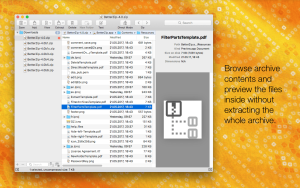
Unlike the built-in Archive Utility, BetterZip lets users inspect the contents of archives without extracting them first. Need just one file from a large ZIP or RAR? You can simply drag it straight out to the Finder or desktop instead of unpacking the entire archive. The app also supports treating archives more like editable documents letting you modify files inside a ZIP in place rather than extracting, editing, and recompressing every time.
Format Support and Compatibility
BetterZip handles an impressive range of formats more than 30 in total, including split archives, winmail.dat attachments, ePub files, and even user-defined formats via JSON. It’s also useful for cross-platform sharing, since it can strip out Mac-specific metadata like resource forks and .DS_Store files, ensuring cleaner archives for Windows or Linux users.
Version 6 Redesign
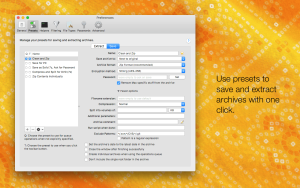
The recent major update to version 6 brought a visual overhaul, including a modern split-view layout, a reorganized Settings window, and design touches inspired by Apple’s newer interface language. It also introduced deeper automation support, with new Shortcuts actions and App Intents that let BetterZip plug directly into macOS automations, plus a command-line helper tool for scripting.
What’s New in 6.0.2
This point release focuses on stability rather than features. It brings sidebar and settings refinements along with fixes for Finder extension icon display on external drives, archive save timestamps, favorites scanning, and handling of file paths containing asterisks.
System Requirements & Pricing
BetterZip 6.0.2 requires macOS 13.5 Ventura or later, and is available as a 30-day full-featured trial followed by a one-time license of around $35 no subscription required. A free Quick Look extension for previewing archives in Finder works regardless of license status.
Getting BetterZip
For genuine updates, support, and licensing, it’s best to grab BetterZip through the official developer site or the Mac App Store rather than third-party “cracked” download sites, which often carry outdated versions or security risks.



About Author
