Butler 4.4.9 for Mac
Butler 4.4.9 for Mac
Butler simplifies a wide range of potentially repetitive tasks. Simply organize these tasks in a fully customizable Butler configuration and assign one or more triggers to each task.
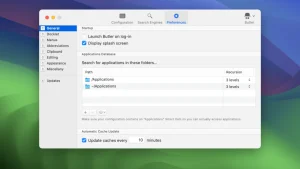
Butler is a manager that provides access to all types of applications and documents through a convenient menu system, hotkeys, interactive corners, or abbreviated controls. The program learns user preferences and remembers which abbreviations are associated with applications (for example, “abo” to launch Address Book). The manager also helps organize bookmarks without being tied to a specific browser.
Unlike web browser bookmarks, they are always available in the general system menu and can be opened with hotkeys or an abbreviation in any of the available browsers.
There’s also a built-in web search tool, available from the menu bar or using hotkeys. The manager already includes a large number of popular search services, but users can add more. A separate module is dedicated to storing frequently used text fragments, similar to the clipboard. Butler also allows you to copy files, manage iTunes, change system settings, and perform other functions.
Butler 4.4.9 for Mac The Original Many Tricks Pony
Long before Alfred, Raycast, or LaunchBar became household names, there was Butler. Developed by Many Tricks (Peter Maurer), Butler is one of the most flexible and comprehensive productivity tools ever built for macOS an application launcher, clipboard manager, web searcher, file handler, and automation engine all rolled into one featherweight 4.5 MB app. Version 4.4.9, released on March 24, 2026, brings important macOS compatibility fixes that keep Butler running perfectly on both the latest and older macOS versions.
What’s New in v4.4.9?
macOS 26 Menu Bar Fix A quirky macOS 26 (Tahoe) issue was discovered where clicking at the very top edge of the display sometimes didn’t register clicks on Butler’s menu bar items. Version 4.4.9 works around this gracefully Butler’s menu bar is now fully responsive, edge to edge, on macOS 26.
macOS 14 Submenu Font Fix On macOS 14 (Sonoma), menu fonts weren’t being automatically inherited by submenus leaving Butler’s nested menus looking visually inconsistent. This is now fixed, and submenus correctly inherit the system font throughout.
Additional Fixes Several other minor fixes and refinements are included all detailed in the full release notes on Many Tricks’ website.
Why Butler Is Still Irreplaceable
Unique Triggers System Butler’s greatest strength is its incredibly flexible triggers system assign any action to a hotkey, menu item, dock item, or even a gesture. No other Mac productivity tool offers this level of trigger customization.
App Launcher Launch any app, file, or folder instantly from the keyboard. Butler learns your abbreviations type a few letters and it finds what you need before you finish typing.
Clipboard Manager Keep a full history of everything you’ve copied and instantly retrieve any item from your clipboard history text, images, files with a quick keyboard shortcut.
Web Search Set up custom web searches and trigger them directly from Butler. Search Google, Wikipedia, Amazon, or any website with a custom query straight from your keyboard.
iTunes / Music Control Control playback, skip tracks, adjust volume, and access your music library without switching apps all from Butler’s interface.
File Operations Open files, move them, copy them, or run scripts on them triggered by any combination of Butler’s inputs. Automate repetitive file tasks with ease.
Plugins & Helpers Extend Butler further with plugins like Current Track Desktop, IP Numbers, and Let My Docklet Breathe — adding live information and extra capabilities to your desktop and dock.
Pricing & Compatibility
- Price: $20.00 one-time purchase from manytricks.com/butler
- Requires macOS 10.13 or later Universal Binary
- Supports both Apple Silicon and Intel Macs
- Just 4.5 MB one of the lightest power-user tools on macOS



About Author
