MouseBoost Pro 4.3.0 for Mac
MouseBoost Pro 4.3.0 for Mac
MouseBoost Pro integrates more than 30 kinds of small tools, and the operation method is very simple. By right-clicking the mouse, you can activate all kinds of functions you want, so that your work efficiency is greatly improved.
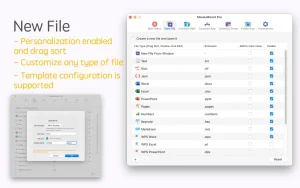
You can create any type of file, open any application, and everything is fully customizable.
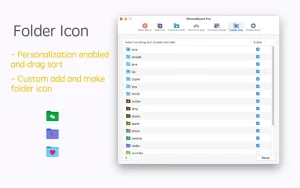
Key Features: – All menus support custom sorting. – Quickly create all kinds of frequently used files, and also supports custom creation of different types of files you want. – Quickly open iTerm2 terminal and go to the directory you want. – Quickly open VSCode, Sublime Text and Emacs, and customize different applications you want to open. – Quickly copy the current path. – Supports complete file deletion. – Supports moving, copying and cutting files. – Supports file compression in encrypted form. – Quickly open your favorite directory. – Quickly get MD5, SHA1, SHA256 and other file information. – Supports hiding and showing specified files. – Supports changing the folder icon.
– New “Paste File” option: Quickly save files or images from your clipboard to the current folder. – One-click “Set Default App”: Change the default application for opening a file instantly, with no extra steps. – New “Folder Size” feature: View the total size of a selected folder along with details of its sub-items to easily spot large files. – Now supports Liquid Glass icons. – Bug fixes and stability improvements.
MouseBoost Pro 4.3.0 for Mac — Supercharge Your Right Click
The right-click menu on macOS is useful but it could be so much more. MouseBoost Pro transforms your right-click into a powerful command center with over 30 built-in tools, all accessible instantly without opening a single extra app. Version 4.3.0 is the latest build, refined and ready to supercharge your daily Mac workflow.
What Is MouseBoost Pro?
MouseBoost Pro is a fully customizable right-click enhancement tool for macOS. Instead of the basic Finder context menu, you get a rich, feature-packed menu that lets you create files, run scripts, manage files, open apps, copy paths, and much more all with a single right-click, anywhere on your Mac.
Key Features
30+ Built-In Tools One Right Click Every tool is just a right-click away. No shortcuts to memorize, no apps to switch between — MouseBoost Pro puts everything right under your cursor.
Shell & AppleScript Automation One of the most powerful additions in the v4.x series — run Shell scripts and AppleScript directly from your right-click menu. Automate repetitive tasks with one click, including one-click switching between dark and light themes, locking your Mac, or putting it to sleep.
Instant File Creation Create any file type you want documents, code files, templates instantly in the current folder. Fully customizable to include the file types you use most.
Quick App Launcher Open Terminal, iTerm2, VSCode, Sublime Text, Emacs, or any app you choose and jump directly to the current directory. A massive time-saver for developers.
File Operations Made Easy Move, copy, cut, and permanently delete files right from the context menu. No more dragging files across windows.
Encrypted Compression Compress files with password-protected encryption directly from the right-click menu fast and secure.
Path Copy Copy the full path of any file or folder instantly with or without the file extension, fully customizable.
File Checksum Info Get MD5, SHA1, SHA256 and other hash information for any file in seconds useful for developers and security-conscious users.
Hide & Show Files Toggle the visibility of hidden files and specific files without using Terminal commands.
Fully Customizable Menus Every menu item supports custom sorting arrange tools exactly the way you want them, so the most-used options are always at the top.
Compatibility
MouseBoost Pro 4.3.0 requires macOS 10.11 or later and supports both Apple Silicon and Intel Macs. Available on the Mac App Store.



About Author
