Loopback v2.4.10 for Mac
Loopback v2.4.10 for Mac
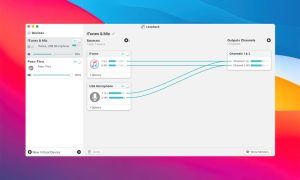
Loopback lets you easily transfer audio from one application to another. Loopback can combine audio from both application sources and audio input devices, making it accessible anywhere on your Mac. With an easy-to-use wired interface, Loopback gives you all the power of a high-end studio mixing console right inside your computer!
Play music and more for podcast guests
Combine your microphone with audio sources, such as music or Farrago, and then select the Loopback device as the source in Skype. Voila! Your guests hear both your voice and your audio additions.
Multiple Devices in One
Apps like GarageBand, Logic, and Ableton Live are limited to recording from only one audio device at a time. With Loopback, you can combine multiple input devices into a single virtual device to capture your entire audio.
Create First-Class Videos
Most screen recorders allow you to include your microphone, and some may even record system audio, but neither option is ideal. Instead, create a virtual device that captures your microphone and application audio to get the exact audio you want.
Gameplay Video Recording
Creating gameplay videos with great audio doesn’t have to be complicated. Use Loopback with devices like the Elgato Game Capture hardware to record both your microphone and game audio simultaneously!
Works well with Audio Hijack
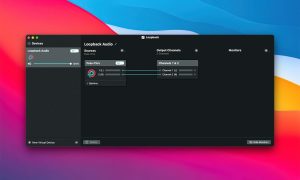
Create a simple pass-through device in Loopback, then set it as an output at the end of any audio capture chain. Now you can select this source as an input in any application to receive the audio.
Much More…
Loopback gives you incredible power and control over how audio is routed around your Mac and between apps. We can’t wait to hear about the incredible new uses you find for it!
Loopback v2.4.10 for Mac Cable-Free Audio Routing, Perfected
Ever wished you could send audio from one app directly into another on your Mac without a single cable, adapter, or workaround? That’s exactly what Loopback does. Developed by Rogue Amoeba, Loopback is the gold standard in virtual audio routing for macOS beloved by podcasters, streamers, musicians, and screencasters worldwide. Version 2.4.10, released on May 7, 2026, is the latest and most polished build yet.
What’s New in v2.4.10?
ARK Plugin Updated to 13.1.1 The ARK plugin the core engine that powers all of Loopback’s audio handling has been upgraded to version 13.1.1. This brings meaningful reliability improvements, optimization enhancements, and crucially, a fix that eliminates the need to enter your administrator password for future updates. It also resolves rare crashes and a bug that could cause lost audio in certain situations.
Decluttered Menus on macOS 26 (Tahoe) Apple introduced forced icons into app menus in macOS 26, cluttering the interface. Loopback 2.4.10 removes these unwanted icons from its menus, keeping everything clean, minimal, and distraction-free exactly how Rogue Amoeba intended it.
Less Intrusive Update Notifications Software update notifications have been redesigned to use a less obtrusive title-bar style, so you’re informed without being interrupted during a recording or live session.
macOS Version Info in About Box Loopback’s About window now displays the current macOS version a small but handy addition for troubleshooting and support.
Why Loopback Is Essential
Create Virtual Audio Devices Loopback lets you build virtual audio devices that combine sound from multiple apps and physical inputs think of it as a software mixing board built right into your Mac.
Pass Audio Between Any Apps Route audio from your music player into a podcast recorder, send browser audio into a streaming app, or feed a DAW into a video call the combinations are limitless.
Nested Devices Nest one Loopback virtual device inside another for even greater routing flexibility and creative control.
Available System-Wide Loopback’s virtual devices appear exactly like real hardware audio devices visible to every app on your Mac, no special configuration required.
Monitor Audio in Real Time Add monitors to any virtual device to hear exactly what’s being routed through it, in real time.
Works with Physical Devices Too Combine hardware inputs microphones, audio interfaces, instruments with app audio sources in the same virtual device.
Compatibility & Pricing
Loopback v2.4.10 requires macOS 14.5 or higher and supports both Apple Silicon and Intel Macs. It’s available from Rogue Amoeba at $99 as a one-time purchase with a free trial available to test before you buy.



About Author
