CleanShot X 4.8.8 for Mac
CleanShot X 4.8.8 for Mac
CleanShot is an excellent screen recording app designed for macOS. With its rich set of tools, CleanShot truly feels like six apps in one. You can use it to quickly capture your Mac screen without desktop icons, record and trim videos, create annotations, save screenshots to the cloud, and much more.
Simple but powerful
CleanShot teaches you simple steps for taking screenshots, while also providing a wealth of options. You can capture an area, the entire screen, just a window, or scrolling through it. Set a timer if you need a few seconds to capture the perfect moment. This app is here to solve your problems.
Hide desktop icons
CleanShot hides desktop icons so you can instantly capture your Mac desktop without wasting time cleaning it. If you need a quick screenshot, turn off the icons and turn them back on when you’re done. You can also set a custom wallpaper for your screenshots—for example, an image or a simple color.
Record your screen
With CleanShot, you can choose to record video or GIF while capturing a specific window, part of the screen, or the entire screen. You can even set a custom zoom level before clicking the Record button. You can also disable desktop notifications while recording.
Annotate, highlight or blur
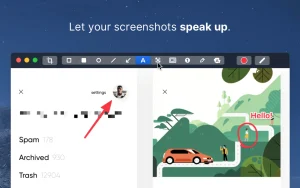
No screenshot is perfect. Using the built-in CleanShot editor, you can highlight or hide specific parts of your photos and add comments if needed. To instantly edit your screenshots, simply click the pencil icon in the Quick Access Overlay menu.
Adjust and attach screenshots
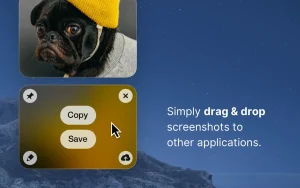
With CleanShot, you get perfectly aligned screenshots by default, but you can, of course, customize them. Switch between Retina and standard resolutions with one click. Want to put your shot in the foreground? Pin your screenshot for better visibility it will float above other active windows. Everything to perfect your workflow.
Release notes are available on the official website cleanshot.com >
CleanShot X 4.8.8 for Mac The Screenshot App That Feels Like Six Apps in One
macOS has a built-in screenshot tool but once you’ve tried CleanShot X, you’ll never go back. Developed by Cleanshot, this is the most powerful, polished, and feature-complete screen capture app on macOS. Version 4.8.8, released on March 23, 2026, is the latest build fixing several important bugs and keeping CleanShot X at the very top of its game.
What’s New in v4.8.8?
Audio Interface Recording Fixed A frustrating bug affecting users with external audio interfaces like Focusrite has been resolved — microphone audio was only being recorded on the left channel. Now both channels record perfectly, making CleanShot X fully reliable for narrated screen recordings.
Window Screenshots with Rounded Corners A visual bug causing window screenshots to appear with sharp corners instead of the correct macOS-style rounded corners has been fixed screenshots now look polished and pixel-perfect.
“Ask for Name” Dialog Fix The “Ask for Name after every capture” dialog now correctly receives keyboard focus when it appears no more clicking into it before you can type.
Emoji Rendering in Annotate A rendering bug affecting emoji in the Annotate tool has been squashed add emojis to your annotations confidently.
Why CleanShot X Is Truly Special
All-In-One Capture Capture anything a selected area, fullscreen, a specific window, or a scrolling window that captures entire web pages and long documents in a single image. Set a timer for a few seconds to capture the perfect moment.
Screen Recording & GIF Record your screen as a high-quality video or an optimized GIF file. Trim clips directly in CleanShot’s built-in Video Editor without needing a separate app.
Annotate & Mark Up The built-in Annotate tool lets you add text, arrows, shapes, highlights, blur sensitive information, and even emojis all from a clean, quick-access overlay that appears right after every capture.
Background Tool Turn any screenshot into a beautiful, social media-ready graphic with CleanShot’s stunning Background Tool add gradients, colours, and padding in seconds.
OCR Text Recognition Need to copy text from a screenshot or scanned image? CleanShot’s built-in OCR extracts text from any image instantly no third-party tool needed.
CleanShot Cloud Upload any capture to CleanShot Cloud with one click and instantly get a shareable link blazing fast, always available.
Hide Desktop Icons Capture clean, clutter-free screenshots by automatically hiding all desktop icons before capturing no manual cleanup needed.
Pin Screenshots Keep any screenshot floating above all windows as a reference great for comparing designs, following instructions, or keeping notes visible.
Pricing & Compatibility
- Price: $29 one-time purchase from cleanshot.com or included with Setapp subscription
- Requires macOS 10.15 (Catalina) or later
- Supports both Apple Silicon and Intel Macs
- 99% satisfaction rate — 13,938 ratings on Setapp



About Author
