ForkLift 4.6.0 for Mac
ForkLift 4.6.0 for Mac
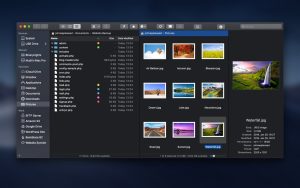
Looking for a reliable FTP client for Mac with a wide range of useful features? This file manager is just what you need. It’s fast and reliable, yet incredibly easy to use. What’s more, it’s a great Finder replacement with much more functionality. Connect to multiple servers simultaneously, easily switch between applications and servers, and compare two text or media files in an instant. And all from the convenient split-screen view of this reliable file manager.
Key Features of ForkLift
Connect to multiple servers
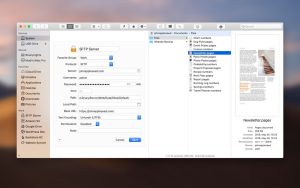
Access FTP, SFTP, Amazon S3, AFP, as well as WebDAV, SMB, and NFS remote volumes. Organize files over the network, connect to multiple servers simultaneously, and drag and drop files to organize them. Mark a saved remote connection as a drive, and launch a saved Synclet even if ForkLift isn’t running.
Quick search, selection and management of archives
Find and select the necessary items even on remote servers by entering file names, extensions, text, or tags. Browse archives as simple folders. Speaking of archive management, the utility supports Quick Look, search, and filters.
Instant viewing capability
Find all the details about a selected file in the preview pane. Inspect photos, PDFs, and other file types. Edit file text on local and remote servers. Set your Mac SFTP client to view files by default, and you’ll see files accessed through it instead of Finder.
One-way or two-way synchronization
Compare local and remote sources with a snap of your fingers using this FTP app for Mac. Find matches, modified, new, and deleted items in archived folders. Instantly sync them one- or two-way, or add them to Favorites.
File Comparison + Single/Double Panel
Easily return the interface to its standard single-pane layout or choose two panels horizontally or vertically. Take advantage of seamless integration with popular file comparison tools to compare similar text or media files.
Quick access to files
Access your devices, menu commands, or favorite files in a flash. Set a keyboard shortcut or assign a toolbar button to quickly access hidden files. Open Terminal, iTerm, or Hyper windows and enjoy everything you need at your fingertips.
ForkLift 4.6.0 for Mac The Power User’s File Manager, Perfected
Finder is fine for casual use but when you need real power, speed, and total control over your files, ForkLift is in a league of its own. Developed by BinaryNights, ForkLift is the most capable dual-pane file manager and remote server client on macOS. Version 4.6.0, released on March 31, 2026, delivers two highly practical new features that power users have been asking for.
What’s New in v4.6.0?
Tag Autocompletion ForkLift 4.6 introduces tag autocompletion as you start typing a tag name, ForkLift intelligently suggests matching tags from your existing library. Tagging files is now faster, more consistent, and far less error-prone. No more duplicate tags or typos cluttering your organization system.
One-Click Access to Custom Tools A brand-new toolbar button for custom tools gives you instant, one-click access to any tool you’ve configured no more navigating through menus to find your most-used automations. Your custom workflow is now always one click away.
Why ForkLift Is the Best File Manager on Mac
Dual-Pane Interface ForkLift’s signature dual-pane layout lets you work with two folder locations side by side making file moves, copies, and comparisons dramatically faster than anything Finder can offer.
Remote Server Support Connect to virtually any remote server directly from ForkLift FTP, SFTP, SMB, WebDAV, Amazon S3, Backblaze B2, AFP, and NIS and manage remote files as naturally as local ones.
Powerful Sync ForkLift’s Sync feature compares two folders local or remote — and keeps them perfectly in sync. Ideal for backups, deployments, and collaborative workflows.
Multi-Tab Workflow Open as many tabs as you need, each pointing to a different location local or remote. Stay organized without ever losing your place.
Rich Metadata Columns List View supports powerful metadata columns including Duration, Rating, Album, and Musical Genre — available in any folder, unlike Finder which restricts these to specific locations.
File Checksum Verification Calculate MD5, SHA-1, SHA-256, SHA-384, and SHA-512 checksums for any file directly inside ForkLift essential for verifying file integrity after transfers.
Batch Rename & Quick Look Rename hundreds of files at once with a powerful batch rename engine. Quick Look previews let you inspect files without opening them.
Synchronized Browsing Browse two panes in sync navigate one pane and the other follows. Perfect for comparing folder structures or maintaining mirrored layouts.
Pricing & Compatibility
- Single-user License: $19.95 | Family License: $29.95 | Small Business: $69.95
- Requires macOS 14.6 (Sonoma) or later — Universal Binary
- Supports both Apple Silicon and Intel Macs
- Available from binarynights.com



About Author
