Mimestream 1.10.1 for Mac
Mimestream 1.10.1 for Mac
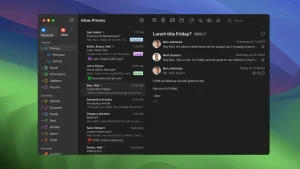
Mimestream combines the power of macOS with the advanced features of Gmail to create a new type of email client that lets you navigate your email with ease. A native app written in Swift, Mimestream harnesses the full power of macOS to provide a fast and instantly familiar experience. Instead of relying on the IMAP protocol, Mimestream leverages the Gmail API to enable a richer set of features that simplify your workflow.
Features: Lightweight and fast Mimestream is built for speed and uses minimal disk space to cache recent messages.
Offline access – Full functionality offline and on the slowest connection ideal for business travelers and anytime you’re on the go.
System Notifications: Receive macOS system notifications when you receive new messages, so you never fall behind on what matters.
Nicknames: Your email aliases are automatically synced with Gmail without any configuration and are used for replies when needed.
Signatures. Signatures set up in Gmail are automatically synced with Mimestream.
Reliable search. Enter any Gmail search query in Mimestream and get consistent results. • Search even when offline. Swipe. Use familiar macOS swipe gestures to quickly sort and archive email.
Tracking Prevention. Read your email privately. Mimestream blocks tracking pixels from over 50 of the most common tracking services.
Keyboard shortcuts: Quickly sort through your email with keyboard shortcuts, including the ability to use familiar Gmail or Apple Mail keyboard shortcuts.
Release notes are available on the official website mimestream.com
Mimestream 1.10.1 The Native Gmail Client for Mac
Mimestream is the best dedicated Gmail client on Mac, and version 1.10.1, released on June 5, 2026, is a quick follow-up to the significant 1.10.0 release fixing a handful of regressions that came in with that update.
What is Mimestream?
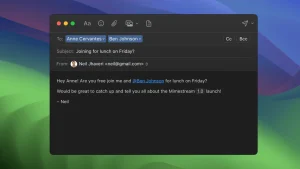
Mimestream is a native macOS email client built exclusively for Gmail. Rather than using generic IMAP, it connects directly to the Gmail API, which means everything feels exactly like Gmail labels, categories, filters, snooze, aliases, and Gmail-backed search all work natively. The app is written in Swift and optimized for Apple Silicon, so it is fast, lightweight, and feels at home on Mac. It supports multiple Google accounts, profile separation for work and personal, a unified inbox view, compose with markdown and templates, undo send, Send-and-Archive, swipe actions, Focus Filters, and tracking pixel prevention.
What 1.10.0 Brought
Version 1.10 turned on the Private Push feature by default for those running macOS 26 Tahoe and later Mimestream’s Private Push notification system delivers real-time notifications without server-side access to your Google account data. The update also displays the full email address of unknown senders, adds a new All profile that displays all accounts in a single unified view, brings new top-level settings tabs for Notifications and Profiles, and improves tracking prevention to pass all Email Privacy Tester tests.
What’s New in 1.10.1
Build 1.10.1 is a maintenance update that fixes regressions from the 1.10 line Unified Inbox content depth, unread counts without categories, notification and unread-filter selection bugs, redundant search queries, and a feedback crash with no enabled accounts. On macOS 26, icons are now shown in conversation view context menus.
Pricing
Mimestream is not on the Mac App Store and is downloaded directly from mimestream.com. A 14-day trial needs no credit card. After that, a subscription is required at $49.99 per year or $4.99 per month, covering up to five devices with family sharing for household members. It requires macOS 12 or later.


About Author
