WhyFi 1.3.0 for Mac
WhyFi 1.3.0 for Mac
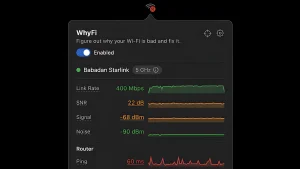
WhyFi is a handy app in the form of a menu bar icon that quickly shows you why your Wi-Fi is slow or unstable and tells you how to fix it.
How it works: WhyFi continuously monitors your connection at several levels:
• Wi-Fi signal (from Mac to router) • Router latency • Internet quality (ISP) • DNS
Each indicator is highlighted in color: green means everything is fine, orange means average, and red means there’s a problem. The icon in the menu bar changes depending on the connection quality.
Peculiarities:
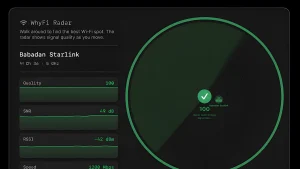
• WhyFi Radar walk around your home/cafe with your laptop, the app updates 4 times per second and says “move on” or “go back”, showing the best signal (0–100 points) • Speed test with bufferbloat detection (a problem with latency under load, important for calls and video) • Wi-Fi channel scanner shows congested channels and recommends which one to switch to • Quick DNS switching (Google or Cloudflare) with one click • Export report for ChatGPT/Claude • Detection of captive portals (hotel/airport Wi-Fi)
WhyFi 1.3.0 for Mac Finally Know Why Your Wi-Fi Is Rubbish
We’ve all been there your Wi-Fi is slow, something isn’t loading, and you have absolutely no idea why. Is it your router? Your ISP? Your DNS? Your signal? WhyFi by James Potter answers that question instantly, from your menu bar, in plain English. Version 1.3.0, released on March 31, 2026, is the build that introduced several of the app’s most-loved features.
What Is WhyFi?
WhyFi is a brilliant little macOS menu bar app built around one simple idea your Wi-Fi problems deserve a real diagnosis, not guesswork. It monitors your connection continuously, separates the different layers of your network, and tells you exactly where the problem is and what to do about it.
As the developer put it: “Built to answer the age old question: why is my Wi-Fi connection absolutely rubbish and/or not working right now?”
Key Features
Real-Time Signal Monitor WhyFi updates your signal reading 4 times per second — so you can walk around with your Mac and see live signal strength changes as you move. It even tells you “keep going” or “go back” to help you find the best spot in your home or office.
Pinpoints Exactly Where the Problem Is WhyFi separates your connection into layers and diagnoses each one independently:
- Wi-Fi signal is the wireless connection itself weak?
- Router is your router responding?
- ISP is your internet provider having issues?
- DNS is your domain name resolution broken?
One-Click DNS Switching Switch instantly to Google DNS (8.8.8.8) or Cloudflare DNS (1.1.1.1) directly from the menu bar no need to dig through System Settings.
Captive Portal Detection On hotel, café, or airport Wi-Fi? WhyFi detects captive portals automatically and lets you know when a login page is required no more wondering why nothing loads.
Export Stats for Help Generate a shareable image of your stats, or copy a plain-text report to paste into ChatGPT, Claude, or a support ticket for expert help a uniquely clever touch.
Battery Friendly WhyFi polls faster when you’re looking at it and slower when you’re not and it sleeps entirely when your Mac sleeps. Smart and efficient.
Compatibility & Pricing
WhyFi is available from whyfi.network and is described as the best budget-friendly Wi-Fi monitoring option on macOS sitting comfortably between free tools and the pro-grade WiFi Explorer Pro.



About Author
