PopClip 2026.7.1 fix for Mac
PopClip 2026.7.1 fix for Mac
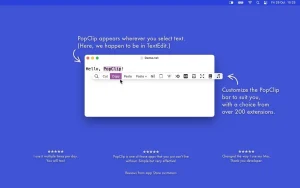
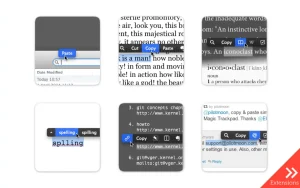
PopClip appears on your Mac when you select text with your mouse. Instant access to context-sensitive actions includes copy/paste and extensions like “Send to Evernote.” If you select text containing a URL, email address, or file path, PopClip will open it. If you select a misspelled word, PopClip will suggest corrections. You can select text to search online or select a single word to look up in a dictionary.
There are over 100 free extensions available, including insertion and style matching, translation, sending to Evernote, word count, uppercase/lowercase, and more.
PopClip 2026.7.1: A Major Update for Mac’s Favorite Text-Action Tool
PopClip has been a staple utility for Mac users for years, popping up a small action bar the moment you select text offering instant copy, search, translate, and dozens of other shortcuts without ever leaving the app you’re working in. The 2026.7.1 release marks the biggest overhaul since the 2025.9 redesign, bringing meaningful changes to how the app is used and managed.
iCloud Sync Arrives
The headline feature is iCloud Sync, which keeps your installed extensions, action layout, and settings aligned across all your Macs. Sync can be toggled from a new Tools menu at the bottom of the Actions pane it’s on by default for fresh installs, and merges synced copies into one unified action list. Sensitive per-action data like sign-ins and API keys sync securely through iCloud Keychain.
No More Action Limits
The actions list now supports unlimited entries, lets the same extension run as multiple independent instances, and adds folders for submenus, separators, and custom icons via Iconify or your own uploaded SVG/PNG files. Arranging actions now supports drag-and-drop with undo, plus a quick search shortcut to find items in a long list.
Smaller but Useful Fixes
The PopClip bar itself now stretches wider on screen, clipboard contents are properly restored after paste-over actions, built-in actions can finally be deleted (and restored later), and the Search action now offers a choice of preset search engines. This build also fixes Ecosia browser recognition and resolves an issue with the Messages extension on the macOS 27 beta.
Pricing and Availability
PopClip is distributed as a standalone download from the developer’s site or via Setapp, and is no longer updated through the Mac App Store legacy App Store users can migrate to the standalone edition to keep receiving updates. The trial allows 250 free action uses before requiring a license. For anyone who purchased PopClip in 2018 or earlier, this is the first paid update, with a discounted lifetime upgrade offer; more recent lifetime and Standard license holders, as well as App Store buyers from 2019 onward, get 2026.7.1 free. The app now requires macOS 13.5 Ventura or later.

Typora 1.13.8 for Mac

Wondershare PDFelement Pro 12.1.12 (OCR) for Mac

1Capture-Screenshot 1.8.0 for Mac
About Author
