Wondershare PDFelement Pro 12.1.12 (OCR) for Mac
Wondershare PDFelement Pro 12.1.12 (OCR) for Mac
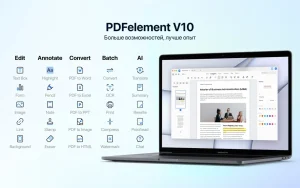
PDFelement is a powerful PDF editor that lets you read, edit, scan, annotate, convert, sign, merge, encrypt, and print PDF documents. With PDFelement, you’ll become a true PDF expert.
PDFelement Standard vs. PDFelement Pro:
*PDFelement Standard = PDF Editor + PDF Annotator + PDF Converter + PDF Reader + PDF Creator + Form Filler
*PDFelement Pro = All features of PDFelement Standard + OCR + Batch Operations + PDF/A Support + Form Creator + Support for Additional Output Formats
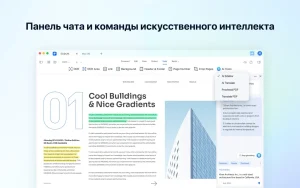
**AI Mode**
– AI commands: Reduce text, Translate, Ask PDF, Summarize, Explain
– AI chat
*** PDFelement Standard ***
√ PDF editor
– Edit text, images, and links in PDF files
– Changing font attributes (type, size and style, alignment)
– Insert, update, or remove custom watermarks and backgrounds
√ Markup and annotate PDF files
– Adding comments, notes, text fields, text footnotes, stamps, adding/editing links, drawn objects
– Highlighting, underlining or crossing out texts
– Create and manage a library of preset and custom stamps
√ PDF converter
– Supported output formats: Word, Excel, PPT, and image formats (.docx, .xlsx, .pptx, .jpg, .png, .gif, .bmp)
– Preserve the original formatting of texts, images, graphics, fonts and embedded elements after conversion
√ Filling out forms
– Filling out PDF forms
– Access to a library of ready-made customizable fillable forms
– Support for creating exclusive electronic signatures/eSign
√ Create PDF files
– Supported input formats: pdf/html/webarchive/rtf/txt/jpeg/jpg/png/bmp/gif
√ Page Management
– Manage pages in a document (change order, insert, extract, crop, rotate and delete pages)
√ Protect and collaborate on PDF files
*** PDFelement Pro ***
√ Equipped with all the features of PDFelement Standard
√ Text recognition
– OCR (Optical Character Recognition) allows you to recognize text and convert text in scanned PDF files or images
– OCR support for 29 languages
√ Creating and signing forms
– Create fillable PDF forms from interactive field objects such as buttons, checkboxes, radio buttons, and drop-down lists
– Support for adding digital signature to forms
√ Merge PDF files
– Combine files of different formats into a new PDF file
√ PDF/A
– Ability to save PDF files in PDF/A format according to ISO standards for long-term archiving
√ Batch processing of PDF files
– Support for processing PDF files in batch mode
– Add backgrounds, watermarks, headers and footers in batch mode
√ Sequential numbering
– Use continuous numbering with advanced formatting options
√ Editing PDF files
– anonymization of sensitive information and images in PDF documents
Unlocking the following PDFelement trial limitations by purchasing the full version in-app is also supported:
– The trial version watermark is not added when saving or printing.
– No page limits when converting PDF files
– Support text recognition function
Wondershare PDFelement Pro 12.1.12 (OCR) for Mac The Smarter PDF Editor
PDF files run the world contracts, reports, invoices, forms, research papers and PDFelement Pro by Wondershare is the Mac app that lets you handle all of them with total confidence. Version 12.1.12, released on April 2, 2026, is the latest build of this powerful all-in-one PDF solution and with full OCR included, it’s one of the most capable PDF editors available on macOS today.
What Makes PDFelement Pro Special?
Full OCR Turn Scans Into Editable Text The standout feature of the Pro edition is Optical Character Recognition (OCR) the ability to scan a paper document or image-based PDF and convert it into fully searchable, editable text. No more retyping contracts or invoices by hand. PDFelement’s OCR engine handles multiple languages and produces clean, accurate results every time.
Edit PDFs Like a Word Document PDFelement Pro lets you edit text, images, links, headers, and footers in any PDF — as naturally as editing a Word document. Change fonts, resize images, reorder pages, insert or delete content — all with a clean, intuitive interface.
Create PDFs from Anything Convert web pages, Word documents, Excel spreadsheets, PowerPoint presentations, and images into polished, professional PDFs in seconds. You can also merge multiple files into one PDF, or split a large PDF into smaller ones.
Convert PDFs to Any Format Go the other way too convert PDFs into Word, Excel, PowerPoint, HTML, EPUB, images, and more. The conversion engine preserves layouts, fonts, and formatting with impressive accuracy.
AI-Powered Tools PDFelement Pro 12 includes built-in AI assistant features summarize long documents, rewrite content, translate text, and get instant explanations of complex clauses all without leaving the app.
Forms Create, Fill & Sign Create interactive PDF forms from scratch or convert existing documents into fillable forms. Fill, sign, and send forms digitally with legally valid electronic and digital signatures.
Annotations & Collaboration Add comments, highlights, sticky notes, stamps, and markups. Share documents for review and track feedback all inside PDFelement’s clean, distraction-free workspace.
Document Security Protect sensitive PDFs with password encryption, permission controls, and redaction tools that permanently remove confidential information not just cover it up.
Batch Processing Convert, compress, watermark, or apply OCR to hundreds of PDFs at once with the powerful batch processing engine a massive time-saver for offices and professionals.
Compatibility & Pricing
- Requires macOS 11.0 (Big Sur) or later
- Supports Apple Silicon and Intel Macs
- Available as a subscription or one-time purchase from pdf.wondershare.com
- Free trial available with full feature access

About Author
