Compressor 5.3 for Mac
Compressor 5.3 for Mac
Compressor tightly integrates with Final Cut Pro to add customizable output options, distributed encoding, and advanced delivery features. With support for 360° video, HDR, HEVC, and MXF, it’s the most powerful and flexible way to export Final Cut Pro projects.
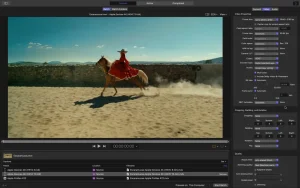
The sleek interface matches Final Cut Pro and makes navigating compression projects easy. View encoding settings in the left sidebar and open the inspector to quickly adjust advanced audio and video properties. Your file appears in the center, directly beneath a large viewer that lets you preview and navigate your file.
Compressor leverages the rendering engine from Final Cut Pro and Motion to ensure consistent speed and quality across applications. It utilizes hardware encoders for H.264 and HEVC, distributes work across multiple CPU cores on your Mac, and utilizes the high-speed GPU on your graphics card to accelerate image processing tasks.
Whether you’re customizing an existing Compressor setting in Final Cut Pro or creating a completely new one, you can share your results with other Final Cut Pro editors, even if they don’t have Compressor installed on their systems. You can also create assignments that combine an encoding setting with a post-encode action to automate tasks like emailing, copying and moving files, or running a custom script.
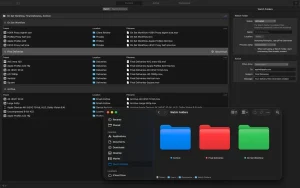
Distributed encoding features are built into Compressor, eliminating the need for a separate app. Simply install Compressor on any Mac on your network and activate it as a cluster node for distributed encoding.
Encode jobs without specialized hardware using preconfigured groups of Mac computers on your network. The “Shared Computers” feature establishes clusters of encoding nodes based on the availability of assigned computers. It can even utilize idle processor cores on a single computer, harnessing the full computing power of multi-core systems.
Compressor 5.3 for Mac Apple’s Latest Update
Apple has released version 5.3 of Compressor, its professional video encoding software that works closely alongside Final Cut Pro. Compressor is a powerful transcoding tool used for converting videos into multiple formats, running batch encoding jobs, and preparing professional delivery packages.
What’s New in Compressor 5.3?
1. Immersive Metadata Viewer This update adds a new pre-encode metadata viewer that lets editors review immersive video details such as camera switching, mirroring, and fading before the encoding process even begins. This is especially useful for creators working with Apple Immersive Video content.
2. 180° Apple Projected Media Profile (APMP) Support Compressor can now encode 180-degree stereoscopic videos in the APMP format, optimized for playback on Apple Vision Pro. This makes the workflow smoother for immersive and spatial video creators.
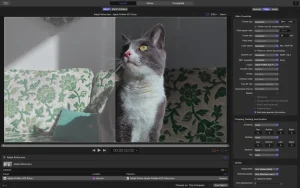
3. Anaglyph Preview for Stereoscopic Video When previewing stereoscopic (3D) footage, editors now have new anaglyph view options, allowing them to check depth and alignment without needing extra hardware.
System Requirements
To run Compressor 5.3, a Mac needs at least macOS Sequoia 15.6.
Who Benefits Most?
This update is particularly valuable for video editors and content creators producing immersive or 180°/360° content for Apple Vision Pro. For everyday video export and batch encoding tasks, Compressor also remains a reliable choice thanks to its speed and tight integration with Final Cut Pro.



About Author
