Movist Pro 2.15.5 for Mac
Movist Pro 2.15.5 for Mac
Movist is an easy-to-use and powerful movie player. You can choose the QuickTime or FFmpeg decoder for each video codec and instantly open it with other decoders. Movist supports many useful features for watching movies, including hardware acceleration for H.264 and H.265/HEVC decoders, digital audio output (S/PDIF), high-quality subtitles, a user-friendly and attractive interface, and much more.
Just enjoy movies with Movist.
– Single-window mode or multiple document mode.
– Application sandboxing is supported.
– Retina display support.
– HDR Tone Mapping
– Various file formats are supported.
– Various video and audio codecs are supported.
– Acceleration of H.264, H.265/HEVC video decoder.
– Various basic image filters are supported.
– Rotate and flip videos.
– Deinterlacing
– Digital audio output (S/PDIF)
– Audio equalizer supported
– Adjust audio/video synchronization.
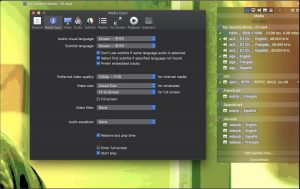
– High quality subtitles.
– Various subtitle formats are supported.
– Built-in subtitles are supported.
– Compressed subtitles in .zip and .rar formats are supported.
– 3D subtitles supported.
– Display subtitles in Letter Box.
– Unlimited simultaneous display of subtitles.
– Fully customizable subtitle display.
– Automatic detection of subtitle text encoding.
– Adjusting subtitle synchronization.
– Autocomplete playlist (search for episodes and subtitle files).
– Playlist shuffle and repeat mode.
– Loading and saving a playlist.
– Adjust playback speed.
– Capture screenshots.
Movist Pro 2.15.5 Mac’s Most Flexible Video Player
Movist Pro is one of the most capable and cleanly designed video players available on Mac, and version 2.15.5, released on May 31, 2026, is a focused maintenance update that fixes several real-world bugs and adds Traditional Chinese localization.
What is Movist Pro?
Movist Pro is a media player for Mac built on top of both QuickTime and FFmpeg giving it two decoder engines under the hood. You can choose which decoder to use for each video codec, or switch between them instantly if a file does not play as expected with one engine. This dual-engine approach means Movist Pro handles virtually every video format you will encounter, from common MP4 and MKV files to more obscure codecs, while still benefiting from macOS hardware acceleration for H.264 and H.265 decoding. It also supports digital audio out via S/PDIF, making it a solid choice for home theatre setups.
Subtitle and Playback Control
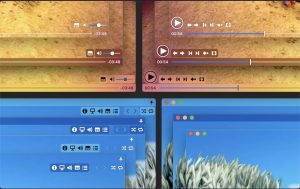
Subtitle support is one of Movist Pro’s strongest points. It supports SMI and SRT formats with highly customizable caption rendering font, size, color, position, shadow, and outline are all adjustable. The full-screen control panel is clean and non-intrusive, appearing only when the mouse approaches the screen edges, keeping the viewing experience distraction-free. The interface supports multiple fully customizable themes and works on Retina displays and traditional or Lion-style full-screen modes.
Pro-Only Features
The Pro edition adds network and web playback, Safari and Chrome browser extensions for playing web video directly in Movist rather than in the browser, SMB server support for streaming from network drives, and playlist management. These additions make the Pro version considerably more useful than the standard edition for anyone with a home server or media collection on a NAS.
What’s New in 2.15.5
This update fixes a specific and noticeable bug where playback would briefly pause after entering full-screen mode on MacBook Pro. A crash that could occur when connecting to an SMB server has been resolved, and an issue with registering the Chrome browser extension has been fixed. Traditional Chinese localization has been added, and Japanese, Simplified Chinese, and Russian translations have been improved.
Pricing and Availability
Movist Pro is available from movistprime.com and is also included in Setapp. It requires macOS 11.5 or later and runs natively on both Intel and Apple Silicon Macs. A lighter standard edition is available separately on the Mac App Store.



About Author
