Dropshare 6.13 for Mac
Dropshare 6.13 for Mac
The number of cloud storage services is overwhelming, isn’t it? Imagine being able to use just one platform that works perfectly with your favorite cloud hosting providers. Like it? Dropshare is definitely worth a try.
This reliable file sharing app with its own ecosystem is perfect if you work with various files online and often need to restrict access to shared links. Upload multiple files at once using drag-and-drop, securely share documents or images with family, friends, clients, and colleagues, and even password-protect your links. Quick and easy file sharing, drag-and-drop uploads, and secure links are just some of the app’s features you’ll expect. Check them out!
Drag and Drop Upload
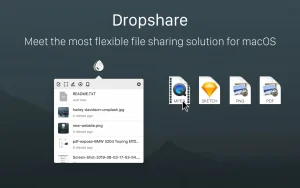
Safely store your files, documents, and photos and access them quickly from anywhere. Upload them to Dropshare. Quickly and easily add any documents, files, images, and folders to your Dropshare account using the drag-and-drop feature in the app menu.
Automatically upload screenshots
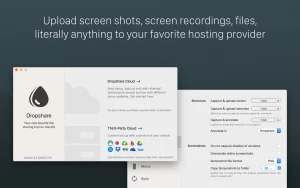
Take screenshots or capture videos from your screen, and the files will automatically be saved to your Dropshare account. It certainly feels like a native macOS feature. Easily share anything on your screen. Add captions to your screenshots.
Send secure download links
Protect your content from others by sharing password-protected download links. This way, only those with the password will be able to view the content. For added security, use temporary links. Set a time limit for how long your link will be available.
Keyboard shortcut capabilities
There are some options that should be accessible with just one click, right? Assign keyboard shortcuts that best suit your needs. Enjoy the ability to complete tasks faster, more conveniently, and in a familiar way.
Download sync history
Keep your entire download history at hand from all your devices. As mentioned at the beginning, this reliable file sharing service supports major cloud hosting providers, so you can work with them all.
Markdown Coordinated Notes
You can create notes in Markdown format from the clipboard or use the built-in editor. Create your own templates using HTML, CSS, or JavaScript whenever you need.
Dropshare 6.13 for Mac The Ultimate File Sharing Tool
If you’re someone who shares screenshots, files, or screen recordings daily on your Mac, Dropshare is one app you simply cannot overlook. Dropshare is a menu bar app for macOS that uploads files, screenshots, and screen recordings to storage you control, then instantly copies a share link to your clipboard.
What’s New in Version 6.13?
Version 6.13 focuses on the annotation editor and screen recording stability. New tools include a Highlight mode that dims the canvas outside a rectangular or circular focus area, curved arrows with per-end arrowhead styles, and richer text formatting options.
This version also brings snapping and non-destructive cropping before upload — making the annotation experience significantly more polished and flexible.
Key Features of Dropshare
Your Storage, Your Control Dropshare uploads directly to your chosen storage provider Amazon S3, Google Drive, OneDrive, Dropbox, SFTP/SCP servers, and dozens more without routing files through any middleman server.
Multiple Connections You can set up multiple upload destinations at once for example, routing personal files to one bucket and client work to another. Hold Command while dragging to choose a destination, or assign separate keyboard shortcuts per connection.
Secure & Professional Sharing Password-protected links, automatic link expiry, and bulk upload history management let you share files professionally without leaving sensitive links open indefinitely.
Custom Landing Pages Uploaded files can have fully custom landing pages built with HTML, CSS, and JavaScript, with dozens of free community-made designs to choose from or you can start from your own branding.
Who Is It For?
Dropshare is ideal for Mac users who share assets daily with clients, teammates, or support channels. With support for 36+ cloud providers and over 30 customization options, it fits virtually any workflow.
System Requirement: macOS 12.3 or later
In short, Dropshare 6.13 is a solid update especially for designers and developers who rely on quick, annotated screenshots and need full control over where their files are hosted.



About Author
