DisplayBuddy v3.6.1 for Mac
DisplayBuddy v3.6.1 for Mac
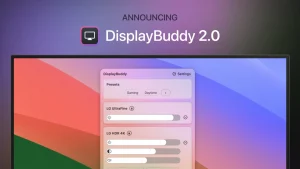
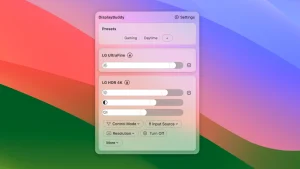
DisplayBuddy is a display management app designed for Mac users. It allows you to adjust display brightness directly from your Mac, without having to press awkward buttons on your monitor. It offers best-in-class support for third-party displays. With DisplayBuddy, users can control the brightness, contrast, and even volume of external displays. Presets are also supported, allowing you to save settings for multiple displays and easily restore them with a single click.
DisplayBuddy’s multi-monitor management feature allows you to manage all your displays, including brightness and volume keys on your keyboard. It also supports custom keyboard shortcuts, making it easy to manage display settings. DisplayBuddy can also synchronize brightness and contrast across multiple displays, easily switch between input sources like HDMI, DisplayPort, USB-C, and more, and activate presets directly from the desktop using the macOS Sonoma widget. It also features UltraBright, which doubles the brightness of your Macbook Pro display on sunny days.
DisplayBuddy is a tool that can significantly improve your daily productivity. Save time and effort by automating your monitor’s brightness, contrast, and volume adjustments.
Features: – Control brightness without reaching for cumbersome buttons on your display – Best-in-class support for third-party displays for the best experience on any display – Control the actual brightness, contrast, and even volume of your external displays – Save settings for multiple monitors and restore them with one click – Manage all your monitors at a glance from a single app – Control your monitors with keyboard brightness and volume keys – Create custom keyboard shortcuts to control your monitors, or use the brightness and volume keys directly from your keyboard – Sync the brightness and contrast of multiple monitors – Switch between HDMI, DisplayPort, USB-C, and other input sources with one click – Activate presets directly from your desktop with macOS Sonoma widgets – Double the brightness on your Macbook Pro displays—perfect for sunny days – Supports Apple Studio Display, Pro Display XDR, Apple Thunderbolt displays, and iMac – Supports DDC on Mac computers with the new Apple Silicon M1, M2, and M3 series chipsets.
DisplayBuddy v3.6.1 for Mac Take Full Control of Every Monitor
Reaching behind your monitor to adjust brightness, or fumbling through on-screen display menus just to change contrast it’s a frustrating ritual nobody should have to perform. DisplayBuddy is the elegant native macOS utility that puts complete control of all your external displays right in your menu bar. Version 3.6.1, released on May 11, 2026, is the latest maintenance release refining the major UI localization improvements introduced in v3.6.0.
What’s New in v3.6.1 & v3.6.0?
UI Localization The headline feature of the v3.6 series is full UI localization DisplayBuddy’s interface is now properly translated and localized, making it accessible to a wider global audience of Mac users managing external displays.
Raised Minimum OS Requirement Version 3.6 updates the minimum system requirements, reflecting a commitment to leveraging the latest macOS capabilities and security standards.
Maintenance & Stability Version 3.6.1 is a focused maintenance release polishing the localization improvements and delivering stability fixes for a smoother overall experience.
Why DisplayBuddy Is a Must-Have
DDC/CI Monitor Control DisplayBuddy uses the DDC/CI protocol to communicate directly with your external monitors adjusting brightness, contrast, volume, and input source entirely from software. No physical buttons, no OSD menus. Just sliders, keyboard shortcuts, and menu bar access.
Powerful Presets Save and restore complete multi-monitor configurations as presets including resolution, rotation, brightness, input source, sync settings, HDR, True Tone, and Night Shift all recalled with a single click.
Smart Schedules Auto-activate your presets based on time of day, sunrise/sunset, charger state, Dark Mode switching, or specific app launches. Your displays adapt to your workflow automatically morning brightness, evening warmth, presentation mode all hands-free.
Display Sync Mirror brightness and contrast changes across all selected displays simultaneously keep every monitor perfectly matched with one adjustment instead of repeating it for each screen.
Studio Display & Samsung Smart Monitor Support DisplayBuddy supports Apple Studio Display, Studio Display XDR UltraBright, Samsung Smart Monitors, and a growing list of smart monitor integrations covering the displays that Mac users actually use.
CLI & MCP Automation Since version 3.3, DisplayBuddy ships with a command-line interface (CLI) and MCP support enabling developers and power users to control displays through terminal commands and automation agent workflows. A genuinely powerful addition for scripted setups.
Free Lifetime Updates Every DisplayBuddy update including major version upgrades like v2 and v3 has been free for all existing customers. Buy once, get updates forever.
Pricing & Compatibility
- Available from displaybuddy.app
- Requires macOS 13 or later
- Supports both Apple Silicon and Intel Macs
- Native Swift app lightweight and efficient


About Author
