HoudahSpot 6.8.2 for Mac
HoudahSpot 6.8.2 for Mac
HoudahSpot is a universal computer search tool. Use HoudahSpot to find hard-to-find files and keep frequently used files within easy reach.
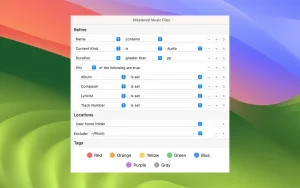
HoudahSpot will feel instantly familiar. It works exactly as you’d expect from a search. Start with a simple search. Refine it by adding and combining criteria. Preview search results. Add columns. Preview files and text matches. Select the files you really need.
Peculiarities:
– Find files by title, text, content type, author, recipient, pixel count, and more.
– Combine criteria to narrow your search results
– Specify which folders to search and which to exclude
– Add any of the hundreds of available columns
– Apply filters to limit search results to only relevant items
– Preview files and text matches
– Open the files and, if the application supports it, continue searching for text matches by pressing command-G (Find Next).
– Setting up templates for recurring search queries
HoudahSpot is based on Spotlight, which comes preinstalled with macOS. It helps you find the files you need:
– Text files containing the word “invoice” or “estimate”
– Image files named “logo” with a width greater than 512 pixels
– Files created, modified, or opened within the last 7 days
HoudahSpot 6.8.2 for Mac: A Sharper Edge for Power Users
Finding a single file buried among thousands on a Mac can be frustrating, even with Spotlight’s built-in search. HoudahSpot, developed by Houdah Software, has long been the go-to solution for users who need more precision than the default macOS search tool offers — and the latest release, version 6.8.2, refines that experience further.
What HoudahSpot Does
HoudahSpot builds on top of Apple’s Spotlight indexing technology but adds layers of customization that Spotlight alone doesn’t provide. Instead of typing a single keyword and hoping for the best, users can combine multiple search criteria file name, text content, file type, author, tags, creation or modification date, image resolution, and more using boolean logic to zero in on exactly the file they need. Searches can be limited to specific folders or drives, and frequently used queries can be saved as reusable templates for tasks like finding recent documents, large files, or client-specific folders.
The results view is equally flexible, supporting list, icon, and thumbnail layouts, with the ability to group files by kind, date, size, or application, and to add hundreds of optional columns of metadata. A built-in Text Preview pane shows highlighted matches in context, so users can confirm a file is the right one without opening it.
What’s New in 6.8.2
The 6.8.2 update, released in June 2026, is primarily a stability and polish release rather than a major feature overhaul. Key improvements include:
- Improved file conflict prompts: when copying or moving multiple files that share the same name, each conflicting file now triggers its own individual prompt instead of a confusing batch dialog.
- A fix for a crash that occurred when previewing certain text files on macOS 26 Tahoe.
- A fix for crashes triggered by unmappable keyboard shortcut combinations.
- A fix for a crash when dragging a saved search to the bottom of the sidebar.
- A fix for a crash when right-clicking a search result while the underlying file was being moved to the Trash.
- A fix for a crash when reordering search criteria while a text field was actively being edited.
These changes follow the slightly larger 6.8 update, which had introduced DEVONthink 4 preview support and a workaround for Spotlight issues with file names containing punctuation.
System Requirements and Pricing
HoudahSpot 6.8.2 runs on macOS 10.14 Mojave or later, supports both Intel and Apple Silicon Macs, and is compatible with the latest macOS 26 Tahoe. It requires Spotlight indexing to be enabled on the system. The app is sold directly by Houdah Software for a one-time purchase of around $34, with a free trial available, and it’s also accessible through the Setapp subscription bundle. Worth noting: Apple Mail message search is no longer supported on macOS Sonoma and later, a limitation tied to changes Apple made on its end rather than to HoudahSpot itself.



About Author
