1Capture-Screenshot 1.8.0 for Mac
1Capture-Screenshot 1.8.0 for Mac
1Capture is a modern and multifunctional tool for creating screenshots.
Features: • Flexible image capture The application supports all the main modes for creating screenshots: area, window, or the entire screen. Unlike the standard macOS tool, 1Capture allows you to freely change the boundaries of the selected area even after you have started drawing it.
• Powerful annotation editor The set of tools for marking up screenshots includes:
– Arrows, lines, shapes and brushes.
– Multi-pixelization (blur/mosaic): you can blur the entire image or just the text on it.
– Numbered Dots: A special annotation feature that allows you to add digital marks to an image and add a transcript as text outside the screenshot, without obscuring important information.
– Fluorescent marker that automatically adjusts to the height of the text.
Smart additional features:
– OCR (Text Recognition): allows you to extract text from any screenshot.
– AI eraser (for Apple Silicon models): a function for removing unnecessary objects from an image using artificial intelligence.
– Pin to Desktop mode: pin an important screenshot on top of all windows so that it is always in front of you.
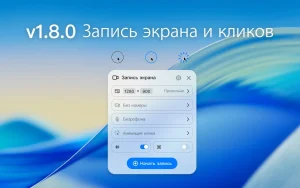
1. Added screen recording and click animation 2. Added GIF recording
1Capture-Screenshot 1.8.0 for Mac Quick Overview
1Capture is a screenshot and annotation tool for Mac built for individuals and teams who want more than the default macOS screenshot tool. It combines advanced screenshot capabilities with productivity focused features such as OCR, desktop pinning, scrolling capture, and customizable workflows.
What’s New in 1.8.0
This version adds screen recording and click animations, along with GIF recording support a step beyond the app’s original screenshot-only focus.
Core Features
- Capture screenshots with advanced annotation tools draw arrows, shapes, highlights, and blur or mosaic sensitive information
- Vertical and horizontal scrolling capture for long content
- Beautify screenshots with custom backgrounds, add text watermarks, and export as WebP
- Pin screenshots to the desktop, use the built-in color picker, set custom keyboard shortcuts, and automate repetitive tasks with custom workflows
- OCR text recognition supporting more than 25 languages
- AI Eraser to remove unwanted objects from images (Apple Silicon only)
Requirements & Pricing
Requires macOS 12.3 or later, on Apple Silicon or Intel Macs. Made by HapiGo Inc., the app is sold at an introductory low price with free upgrades for life on every future update.

About Author
