Firewall Scudo 3.0.4 for Mac
Firewall Scudo 3.0.4 for Mac
Scudo is a hybrid firewall that combines incoming network-level filtering with outgoing application-level control. Designed for those who want to protect their data without having to navigate complex network settings, it offers a simple, intuitive interface with a menu bar icon.
It’s a product from the developer of the well-known utilities Murus and Vallum, but Scudo is positioned as a simpler and more user-friendly alternative.
Two levels of protection. Scudo’s key feature is the combination of two types of filtering:
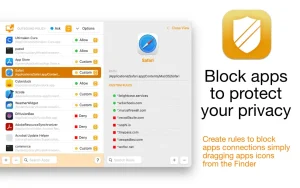
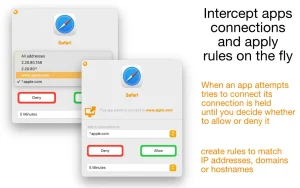
Outbound Firewall. This feature monitors which applications on your Mac are accessing the internet. When any program attempts to establish a connection for the first time, Scudo displays a notification, and you decide:
• Allow or block access.
• Make the rule temporary or permanent.
• Configure access for a specific IP address, range or domain.
This prevents programs from connecting to servers without your knowledge, sending telemetry, or sharing your data without your permission.
Inbound Firewall. Scudo protects your Mac from unwanted external connections. If a remote computer attempts to connect to your services (File Sharing, Remote Login, Screen, etc.), the app will also display a notification and ask for confirmation. You can create custom rules for any network service or use the built-in library.
Firewall Scudo 3.0.4 for Mac Simple Yet Powerful Network Protection
Most Mac users rely on macOS’s built-in firewall, which only handles inbound connections. Scudo goes much further protecting your Mac from both directions at once.
Scudo is a hybrid firewall for macOS that combines an inbound network-layer packet filter with an outbound application-layer firewall. It helps protect your Mac’s network services from unwanted connections from remote computers and improves your privacy and security by controlling all apps’ network activities letting you choose which app is allowed to connect to the network. Everything is controlled in a single window and its usage is really simple and safe.
What’s New in Version 3.0.4
Version 3.0.4 adds full compatibility with macOS Sonoma. On macOS Sonoma, Scudo needs authorization to access macOS Location Services in order to report the current SSID and provide rules conditions functionality.
Key Features
Signature Fingerprint Security Scudo uses a new technology to identify processes and apps by their signature fingerprint rather than absolute path so you are always sure that only genuine apps are allowed to connect. Should an authorized app be modified, hacked, or tampered with, Scudo will notify you and block it.
Global Block Lists You can define a global list of blocked IP addresses and CIDR network addresses so all inbound and outbound connections from those addresses are blocked. You can take advantage of public block lists available on the internet to block well-known dangerous hosts and networks.
Hotspot Protection An extra security feature automatically blocks all inbound connections when you are connected to an untrusted Wi-Fi hotspot so when you are at home your file sharing works normally, but on a public hotspot you are automatically protected without having to change any settings manually.
Profiles for Every Environment You can create as many profiles as you want and switch between them with a single mouse click, allowing you to quickly adapt your firewall configuration to your current environment.
Complete Privacy Scudo respects your privacy no data is collected by the app, and your personal information or files are never accessed. It is a one-time purchase with no subscriptions and no ads, and supports Family Sharing.
Price: $10.00 (one-time purchase) Compatibility: macOS 11.3 or later, Intel and Apple Silicon
If you want real, two-way network protection on your Mac without the complexity of enterprise tools, Firewall Scudo 3.0.4 is an affordable and highly capable solution that every privacy-conscious Mac user should consider.



About Author
