Screegle – Clean Screen Sharing 2.2.12 for Mac
Screegle – Clean Screen Sharing 2.2.12 for Mac
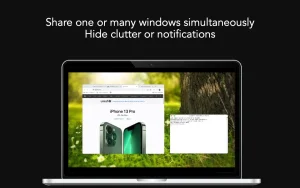
Screegle lets you share any window you want over a clean desktop background. Screegle = screen sharing for professionals.
Your colleagues, team, clients, or students see a clean, uncluttered version of your desktop that contains only the windows you’ve selected and nothing else.
No more pop-up notifications, personal websites, files and folders that could reveal personal information.
Using Screegle is very simple:
1 – Press ⌘ F1 over any window you want to select or deselect (a blue ribbon will appear around it)
2 – In your video conferencing app, share the “Screegle Share” window and you’re all set!
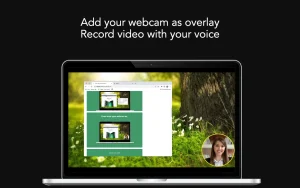
You can also record a video of your Scregle windows using your voice.
This is useful for sharing clean desktops with colleagues for asynchronous communication.
And you can even add your webcam as an overlay, useful while recording your screen or when you’re presenting windows and want people to focus on you.
Screegle Clean Screen Sharing 2.2.12 for Mac Share Your Screen Like a Pro
Ever been on a Zoom call and accidentally shown your messy desktop, personal notifications, or private files? Screegle makes sure that never happens again.
Screegle is a macOS utility that lets you share or record only the windows you choose, composited on a clean background instead of your full desktop with icons, folders, and notifications visible.
What’s New in Version 2.2.12
Version 2.2.12 introduces a freemium model the app is now free to download with an optional upgrade to Screegle PRO at around $7.99. The free tier includes a non-editable “Screegle for macOS” text overlay. This release also fixes issues with Show Screegle Share and Show Preview commands.
How It Works
Getting started takes seconds. Press Command+F1 while hovering over any window to add or remove it from your share set, then in Zoom, Google Meet, or your favourite meeting app simply choose “Screegle Camera” or share the “Screegle Share” window.
Key Features
Everything in One Place With Screegle you can share selected windows live or record them as polished videos, present multiple windows together on a clean background, add your webcam including a connected iPhone or iPad, add live closed captions while you speak, crop sensitive areas before sharing, highlight and magnify your cursor with animated click effects, and use custom wallpaper images and videos.
Smart Scaling Smart Scaling automatically enlarges windows to fit a HD or wide monitor layout, keeping your shared content looking sharp and well-sized without manual adjustments.
Complete Privacy Screegle does not collect user data recordings are saved locally on your Mac and speech recognition runs fully on-device.
Compatibility: macOS 12.3 or later, Intel and Apple Silicon
Whether you’re a remote worker, educator, developer, or content creator, Screegle 2.2.12 is the cleanest and most professional way to share your screen on a Mac and now it’s free to try.



About Author
